
Description
SitePulse tells you exactly what slows your site and what to do about it, directly from your WordPress dashboard.
Activate it, and within seconds you will see which plugins are heavy, which external calls are slow, and how to make your site faster.
🚀 Key Features
🚀Stop Guessing Why Your Site is Slow
– 🚀 AI Diagnostic – Get instant insights into what’s slowing down your site with AI-powered diagnostics
– ⚡ Real-Time Performance Dashboard – See live load-time metrics, Core Web Vitals, and performance trends at a glance
– 📊 Health Score System – Get a composite health score based on load time, TTFB, error rates, plugin count, memory usage, and CPU utilization
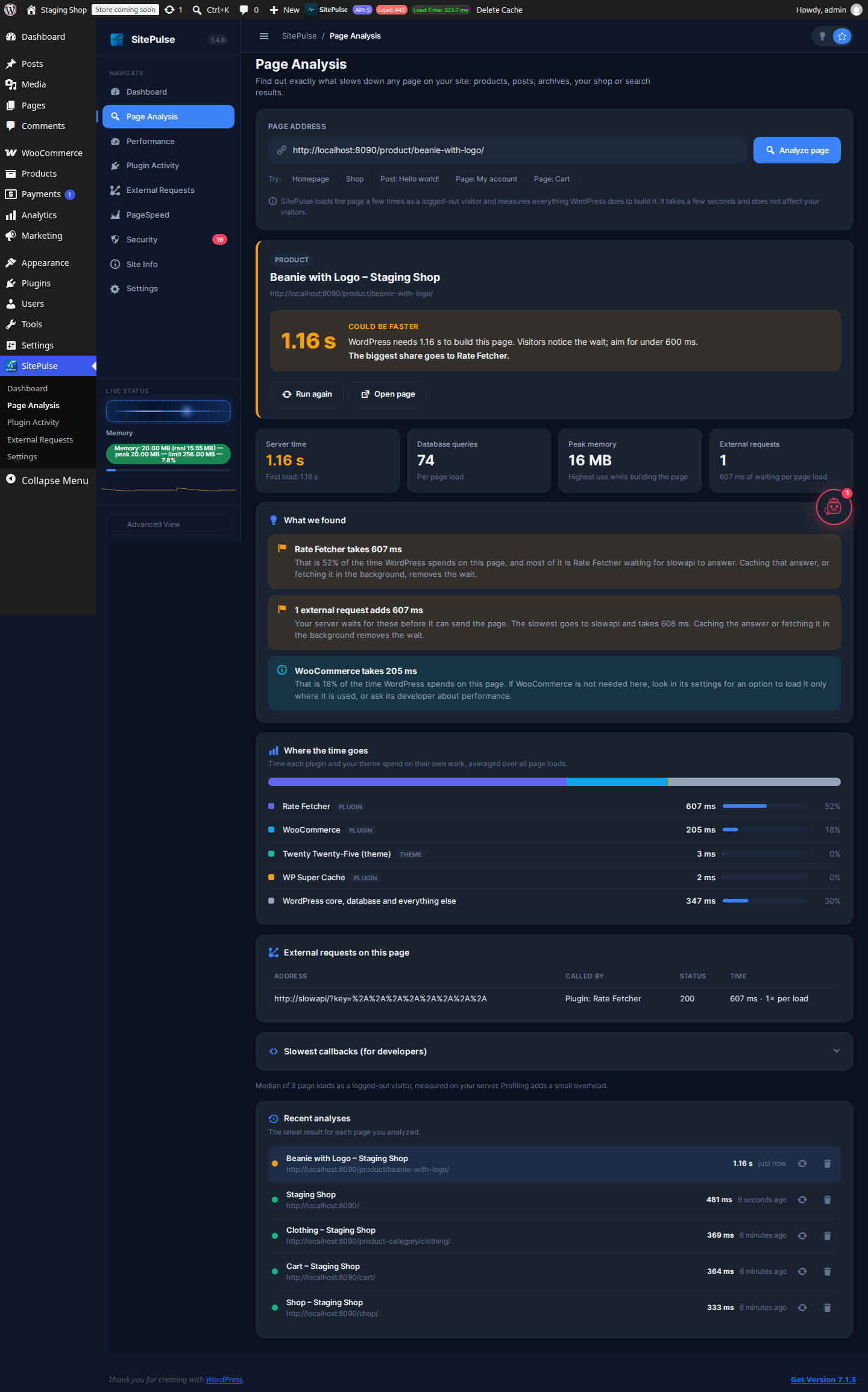
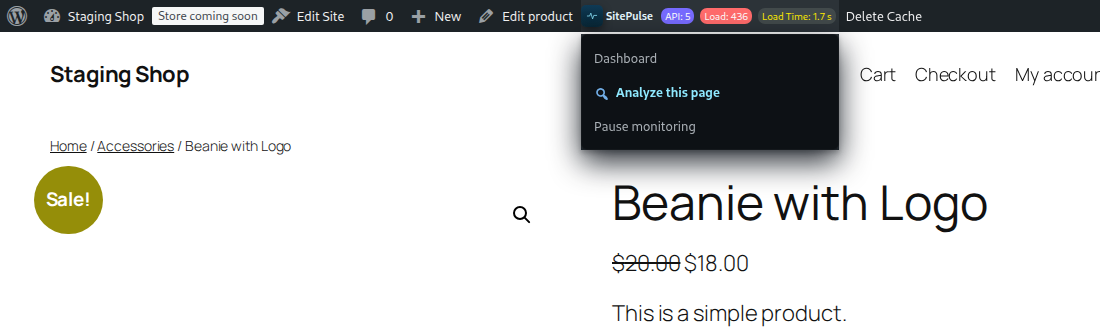
– 🔎 Page Analysis – Paste any address (a product, post, archive, your shop or search results) and see exactly which plugins, theme code and external requests slow that page down, with plain-English fixes. Start it from the toolbar on any page with “Analyze this page”.
– 📈 Trend Analysis – Track performance metrics over time to spot issues before they become critical
🔍Identify Heavy Plugins Instantly
– 🔍 Slow Plugin Profiler – Instantly detect which plugins are bottlenecks and how much time they consume
– 🎣 WordPress Hook Analyzer – See execution times for every hook to pinpoint slow callbacks
– ⏱️ Detailed Timing Data – Get millisecond-level timing information for debugging and optimization
– 🏆 Performance Rankings – Sort plugins and hooks by execution time to focus on what matters most
API & External Service Monitoring
– 🌐 API Request Tracker – Monitor all external API calls (payments, analytics, social media, etc.) with response times
– ⚠️ Slow API Detection – Get alerts when third-party services are slowing down your site
– 📍 URL & Response Code Tracking – See exactly which endpoints are slow and their HTTP status codes
Site Health & Stability
– 🚨 Automatic Fatal Error Detection – Get instant email notifications when critical errors occur
– 📋 Comprehensive Error Logs – Track all PHP errors, warnings, and notices with automatic cleanup
– 🔄 Recovery Mode Access – Safe access to fix critical issues without being locked out of your site
– 💾 Error Statistics – View error trends and identify recurring issues
Server & Resource Management
– 💾 Memory Usage Monitoring – Track server memory consumption and identify memory hogs
– ⚙️ CPU & System Resource Tracking – Monitor system resource usage in real-time
– 🔧 Cron Job Spam Prevention – Automatically disable excessive scheduled tasks during high-traffic periods
– 📊 Plugin Count Analysis – Get recommendations on how many plugins are optimal for your setup
Smart Features
– 🎨 Simple and Advanced dashboards – Start with the Simple dashboard and its guided checklist, or switch to the Advanced view for hook-level detail
– 🧠 AI-Powered Diagnostics – Get AI recommendations for performance optimization (coming soon)
– 🎯 Google PageSpeed Integration – Built-in PageSpeed Insights reports with actionable recommendations
– 📧 Email Alerts – Customizable alerts for critical errors with team member management
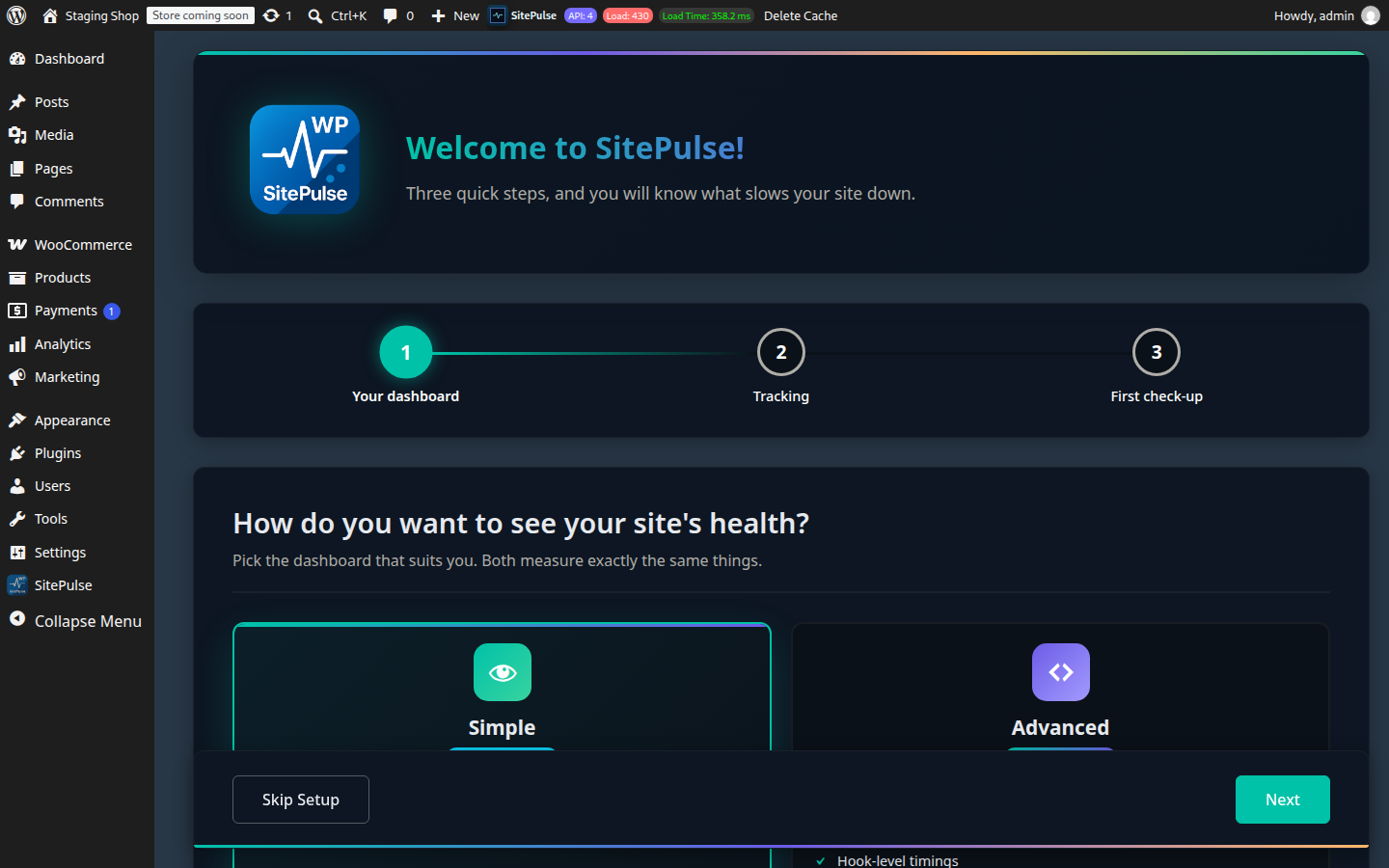
– ✅ Smart Onboarding – A three-step setup that ends with a real check-up of your homepage
Developer-Friendly
– 👨💻 Advanced Profiler Data – Hook-level metrics and detailed execution analysis for developers
– 🔐 Privacy-First Design – Runs 100% locally with optional external features you control
– 📱 Admin Bar Widget – Quick access to performance metrics from anywhere in WordPress
Customization & Control
– 🎚️ Toggle Features On/Off – Enable or disable monitoring features as needed
– ⏸️ Pause Monitoring – Stop measuring page loads from the toolbar without deactivating; settings and history are kept
– 🔐 Optional External API – Use PageSpeed and AI features completely optional—disable anytime without affecting core monitoring
– 📊 Custom Reporting – View detailed reports filtered by date, plugin, hook, or error type
– 🛡️ Email Blocking – Block outgoing emails during testing or prevent email spam
Security
– 🛡️ Vulnerability Scanner – Scan your site for known vulnerabilities and get recommendations for fixing them
💎 Core Features are Free Forever
We believe every site owner deserves a fast website. The Performance Monitoring, Plugin Profiler, Error Tracking and all the current features included in this version are Free Forever. We will never paywall these essential tools.
🚀 Coming Soon: SitePulse Pro
We are developing a Pro version for agencies and power users who need historical data and automation.
* Ai-Powered Auto-Fixing (Coming Soon)
* Access to our portal (Coming Soon)
* 📤 **CSV & PDF Exports – Download performance logs and data for deeper analysis and reporting
* Historical Performance Timelines (Coming Soon)
* Advanced SQL Query Monitor (Coming Soon)
* Multi-Site Dashboard – Manage and monitor all websites from a single admin dashboard.(Coming Soon)
* Performance Alerts & Notifications – Get notified of performance regressions with detailed change analysis(Coming Soon)
* PageSpeed Deep Dive – Full PageSpeed Insights reports with opportunities, diagnostics, and lab data(Coming Soon)
* Historical Performance Charts – Track performance metrics over weeks and months with trend analysis(Coming Soon)
* Opportunities & Recommendations – Actionable optimization suggestions from PageSpeed with implementation guides(Coming Soon)
* Custom Reports & Exports – Generate and download detailed performance reports in multiple formats(Coming Soon)
* Multi-Page PageSpeed Tracking – Monitor PageSpeed Insights performance across multiple pages and URLs with individual reports and comparisons(Coming Soon)
* URL Performance Dashboard – Track performance metrics for specific URLs, homepage, key landing pages, and custom URLs you select(Coming Soon)
* Scheduled PageSpeed Audits – Automatically run PageSpeed Insights on multiple URLs on a schedule to track performance trends(Coming Soon)
* Comparative Analysis – Compare PageSpeed scores and metrics across different pages to identify which content needs optimization(Coming Soon)
* Vulnerability Scanner automatic & Alerts – Scan your site for known vulnerabilities and get recommendations for fixing them
* Unlimited and fast and precise AI Diagnostic – Get instant insights into what’s slowing down your site with AI-powered diagnostics
* **And more.
👉 Join the Pro Waitlist – Get early access, exclusive launch pricing, and be among the first to unlock advanced features.
External Services & Data Privacy
SitePulse uses an external service to provide enhanced features including PageSpeed analysis and AI-powered diagnostics.
🔗 External Service Integration
SitePulse communicates with api.sitepulse.me (operated by the plugin developer) to provide:
– PageSpeed Reports – Google PageSpeed Insights analysis with performance scores, Core Web Vitals metrics, and page screenshots
– AI Diagnostic Reports – AI-powered performance analysis and optimization recommendations
📊 What Data is Collected?
To provide these enhanced features, SitePulse sends only performance-related metrics to the external API:
– Plugin names, versions, and slugs installed on your site
– WordPress hook execution times and memory usage
– API request URLs and response times
– Site domain name
– Performance statistics and load times
🔒 What Data is NOT Collected?
SitePulse is designed with privacy in mind and does NOT collect:
– ❌ Personal user data (names, emails, passwords, IP addresses)
– ❌ User content (posts, pages, comments, custom data)
– ❌ Database content or sensitive information
– ❌ Customer or visitor information
– ❌ Any personally identifiable information (PII)
⏰ Data Transmission Schedule
- You can view what data will be sent in the SitePulse dashboard before transmission
- Transmission only occurs when enhanced features are enabled
🔐 Your Control & Privacy
- All data transmission is for the purpose of providing PageSpeed and AI diagnostic features
- You can disable these features at any time from the plugin settings
- The plugin continues to work locally without external features
- No data is sold or shared with third parties
Service Terms: By using SitePulse’s enhanced features, you acknowledge that performance metrics are sent to api.sitepulse.me for analysis.
Privacy: For more information, visit: https://sitepulse.me/privacy/
Support
Having trouble or have suggestions?
Visit the SitePulse Support Forum or open an issue on GitHub.
We respond quickly and love feedback that helps improve performance visibility for everyone.
Screenshots






Installation
Try it in WordPress Playground (No Installation Required)
You can instantly try SitePulse without installing anything using WordPress Playground:
This opens a temporary WordPress environment in your browser with SitePulse pre-installed and activated.
Standard Installation1. Upload the sitepulse folder to /wp-content/plugins/
- Activate SitePulse from the Plugins screen.
- Open the SitePulse Dashboard menu to view metrics and configure options.
- (Optional) Set up scheduled checks using WP-Cron or your hosting panel’s cron jobs.
FAQ
-
Can I try SitePulse without installing it?
-
Yes! You can instantly try SitePulse using WordPress Playground — a browser-based WordPress environment. Click Try SitePulse Demo to launch a temporary WordPress site with SitePulse pre-installed. No account or installation required.
-
Does SitePulse slow my site down?
-
No. SitePulse is built to be lightweight and runs asynchronously. Profiling is optional and can be toggled off anytime, or paused entirely from the SitePulse toolbar menu (“Pause monitoring”) without deactivating the plugin.
-
How do I find out why one specific page is slow?
-
Open the page on your site and choose SitePulse Analyze this page in the toolbar, or go to SitePulse Page Analysis and paste its address. SitePulse loads the page a few times as a logged-out visitor and shows how long WordPress needs to build it, how much of that time each plugin and your theme take, every external request the page makes, and what to do about it. It works for any front-end address: products, posts, pages, archives, your shop and search results.
-
Page Analysis says my server could not load the page. What now?
-
Some hosts, firewalls and password-protected staging sites block a site from requesting its own pages. Click Open the page and measure my visit: the page opens in a new tab, SitePulse measures that visit, and the report appears in the first tab. The same happens if a page cache or CDN answers instead of WordPress.
-
Can I pause SitePulse instead of deactivating it?
-
Yes. Choose Pause monitoring in the SitePulse toolbar menu (or “Pause instead of deactivating” when you deactivate). SitePulse stops measuring page loads, so it adds no profiling overhead, and keeps your settings and history. Choose Resume monitoring when you need it again.
-
Does SitePulse use external services?
-
Yes, but only for optional enhanced features. SitePulse can communicate with api.sitepulse.me to provide PageSpeed reports and AI diagnostics. The core monitoring features work 100% locally without any external connection. Only performance metrics (plugin names, load times, memory usage) are sent — never personal data or user content.
-
What data does SitePulse send externally?
-
When enhanced features are enabled, SitePulse sends only performance-related data: plugin names/versions, hook execution times, memory usage, and API request metrics. NO personal information, user data, database content, or sensitive information is ever collected or transmitted.
-
Can it work with WooCommerce or multisite?
-
Yes. Page Analysis works on any front-end address, including WooCommerce product, shop, cart and category pages, and SitePulse runs on multisite environments.
-
Is this a “Lite” version with limited features?
-
No. This is the Core version of SitePulse. It is a fully functional, unlimited performance monitor. We are building a separate Pro version for advanced historical data and AI features, but the features you see here today will remain free forever.
-
How do I join the Pro waitlist?
-
You can sign up to be notified when Pro launches at sitepulse.me.
Reviews

Contributors & Developers
“SitePulse – Performance Monitor and AI Diagnostics” is open source software. The following people have contributed to this plugin.
Contributors

Translate “SitePulse – Performance Monitor and AI Diagnostics” into your language.
Interested in development?
Browse the code, check out the SVN repository, or subscribe to the development log by RSS.
Changelog
1.4.6
- New: Page Analysis. Analyze any page (products, posts, archives, your shop, search results) and see which plugins, theme code and external requests slow it down, with plain-English findings. Replaces the old single-page tracking, which only supported posts and pages and mixed in data from other requests.
- New: “Analyze this page” in the toolbar on every front-end page.
- New: when the server cannot load its own pages, Page Analysis measures your browser visit instead.
- New: Pause and resume monitoring from the toolbar, without deactivating.
- New: getting-started checklist on the dashboard.
- Improved: the Simple dashboard (Easy Mode) is now the default; the classic dashboard is the “Advanced view”. Dashboard preferences are saved per user instead of per browser.
- Improved: onboarding ends with a real check-up of your homepage.
- Improved: plain menu names: Page Analysis, Plugin Activity and External Requests.
- Improved: profiler measures each callback’s own time, so nested plugins are no longer counted twice.
- Improved: pages for visitors no longer load jQuery or SitePulse styles; only administrators who see the toolbar do.
- Improved: the deactivation dialog offers to pause instead, a quick-start guide and a support link, and can be translated.
- Improved: uninstalling also removes the error log and plugin timing data.
- Fixed: switching off External Requests tracking now really stops it (it kept recording before), and the dashboard switches confirm the right state.
- Fixed: single-file plugins (such as Hello Dolly) appear under their own name in Plugin Activity.
- Fixed: a deprecation notice from the error handler on PHP 8.4 and newer.
- Fixed: PHP warnings and errors (such as “Undefined array key avg_ms”) when a site still holds data saved by earlier versions or damaged data.
- Removed: the simulated “Real-Time Tracking” modal on the front end.
1.4.5
- Better reporting
- Cron Fixes
1.4.4
- Fixed an UI bug
- Improved performance for plugins with hooks
1.4.3
- Hooks now display the url of the page that triggered it
- Remove sitepulse pro dependencies
- Added early profiler
- Auto increment profiler calls when persistent
- Auto detect active hooks activately consuming resources
- Fixed a bug where the hook report was not showing
1.4.2
- Hook and api hook bugs fixed
1.4.1
- Better performance handling
- sitepulse alternative cronjobs management
- Fixes
1.4.0
- Easy Mode for beginners
- AI Assistant integration
- Fixes
1.3.6
- Streamlined onboarding wizard from 7 steps to 3 steps for faster setup
- Added performance impact indicators (High Impact, Average, Good) for plugin activity
- Added internal request identification in External Requests reports
- Admin bar compact view mode option for cleaner interface
- Clarified feature naming: “Performance Monitor” and “External Requests tracker”
- Enhanced settings page with email blocking and WP Cron configuration warnings
- Improved deactivation feedback modal
1.3.5
- Autoload option
- Error report free version
- Cron fails detection
- Feedback from deactivation – Help us to improve
1.3.0
- Whitelabel support
- AI Diagnostic is here!
1.2.8
- vulnerabilities scan + fix and improvements
1.2.2
- Hotfix and cleanup
1.2.0
- Complete UI redesign with modern, intuitive dashboard interface
- Enhanced plugin load time detection and performance metrics
- Refreshed frontend and backend iconography for better visual clarity
- Improved API request tracking and cron job management
- Comprehensive error handling with fatal error email notifications
- New Basic View for simplified performance overview
- Code optimization and performance improvements
- Added PageSpeed Insights widget integration
- Fixed recovery mode email notifications
- Introduced performance glossary for user education
- Refined button styling with design system guidelines
- Google PageSpeed Insights branding and integration
- Confirmed compatibility with WordPress 6.9
1.1.1
- Added admin notices to surface important updates and status messages
- Automatically enable Tracker mode when the plugin is activated
- Confirmed compatibility with WordPress 6.8
1.1.0
- Added frontend tracking interface
- Block cronjobs and outgoing emails
- Load time tracking per page and plugin usage report
1.0.0
- Initial public release with uptime monitoring, dashboard, and basic profiler