
Description
🏆 An easy-to-use plugin for generating accurate WooCommerce product feeds for 200+ Online Marketplaces 🤩
Generate accurate product feeds to list your WooCommerce products on any marketplace with just a few clicks.
📘 Documentation | 🎥 Video Tutorials | 🌟 All Features | 🚀 Live Demo
Reach thousands of buyers by listing your products on marketplaces like Google Shopping, Facebook, Instagram, TikTok, eBay and more.
Product Feed Manager ensures your feed has all needed attributes, accurate data, the correct format, and optimized content.
This gives you a proper feed with fewer rejections, better visibility, and a higher chance to increase sales.
The plugin comes with pre-defined merchant templates for over 200 popular online marketplaces & own feed validation feature to catch errors before submission.
🚀 Get Access To Feed Generation For 200+ Online Marketplaces Using Product Feed Manager
- Google Shopping feed & Other WooCommerce Google Product Feeds.
- Facebook feed & Instagram Product Feeds
- TikTok Ads
- Twitter Ads (X)
- Idealo (+5 more in Germany 🇩🇪)
- Bing Shopping feed
- Sears, BloomVille (+10 more in USA 🇺🇸)
- Pinterest Product Feed & Snapchat Product Feed
- Yandex Market (YML)
- Marktplaats, Tweakers (+7 more in Netherlands 🇳🇱)
- Rakuten Marketplace Feed (in Japan 🇯🇵)
- Vivino XML Feed, Fruugo, Trovaprezzi (+ many more from Europe & UK 🇬🇧)
- Large marketplaces in Czechia 🇨🇿 include Heureka XML feed, Glami XML feed, and Favi Compari feed (to sell furniture online).
- eBay Seller Center & eBay MIP Feed
- And Many More – Over 200+
Why Use Product Feed Manager for WooCommerce? 🤔
Building WooCommerce product feeds manually is slow and often causes errors. So, stop wasting time fixing rejected feeds and losing ad spend.
With Product Feed Manager, you can:
– Get your products approved faster – automatic attribute mapping and category matching prevent errors that usually block feeds.
– Reach more customers across 200+ marketplaces – Google, Meta, TikTok, Pinterest, and more, all supported out of the box.
– Save hours of manual work – generate perfect feeds in 3 simple steps, even for thousands of products.
– Keep your ads accurate and up to date – scheduled auto-sync ensures prices, availability, and stock levels are always correct.
– Scale without server crashes – batch processing handles large catalogs effortlessly.
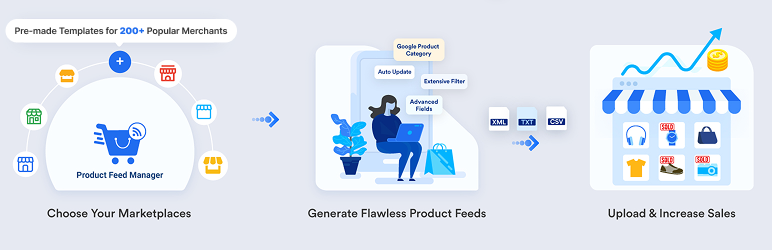
How It Works in 3 Steps
- Select Your Marketplace – Google, Facebook, TikTok, or any supported channel.
- We Your Product Data – use pre-built templates or customize with filters, category mapping, and custom fields.
- Publish & Sell – feed is ready for submission, so your products start selling faster.
Use pre-configured templates for 200+ marketplaces or customize your feed with advanced options like Google auto-sync, filters, and dynamic attributes.
Then submit the feed to your marketplace and start selling quickly.
Use pre-configured templates for 200+ marketplaces or customize with features like:
* Category mapping
* Custom fields and product filters
* Google auto-sync and more
🌟Generate WooCommerce Product Feeds For Google Shopping & Facebook Feed 🌟
Trusted by over 17,000+ users with a 4.8/5 rating (230+ 5-star reviews), Product Feed Manager for WooCommerce makes it simple to create accurate Google Shopping feeds and Facebook product feeds.
Get everything you need for an accurate Google Merchant Feed (Google Shopping Feed) or Facebook Feed:
- Pre-built Template for Google Shopping & Facebook Feed
- Custom Fields for Unique Identifiers (GTIN, MPN, UPC, and more)
- Easy Google Category Mapping
- Support Variable Products
- Accurate Structured Data Format
- Auto-sync With Google Merchant Center
- Facebook Pixel & Google Dynamic Remarketing Pixel Support
- Schedule auto-feed updates
- Feed validator for Error-free submission
-
And many more
-
Learn more about generating a Google Shopping Feed easily!
▶️ UTM Support For Google Analytics
You may add UTMs to your product URLs to track and analyze the effectiveness of your campaigns via Google Analytics.
▶️ Auto-sync with Google Shopping
You can auto-sync your store products with Google Merchant Shop (Google Shopping).
That way, your product data feed will automatically be updated and sent to your Google Merchant Shop as per your schedule – no need to download and upload the feed file manually.
▶️ Go Beyond Google Shopping – Distribute To Other Google Destinations
Besides the traditional Google Shopping feed creation, the plugin supports various Google Destinations such as DRM, Google Local Products Inventory, Google Manufacturer Center, etc.
🌟 Fast And Accurate Product Feed Generation 🌟
Product Feed Manager has designed to generate accurate product feeds using batch processing.
It ensures your resources are not exhausted, and you still get a super-fast product feed generation.
We’ve had cases where users had over 10,000 products, and it took less than 5 minutes to generate the feed.
Meaning, higher approval from your merchants, without wasting hours of your time!
You will get a reliable support team to help you out at all times, plus detailed documentation and video tutorials.
🧩Compact Features For Easy Feed Generation Without Extra Effort🧩
Feed generation for Google Shopping and Facebook Marketplace is one of our specialties.
But you will get more features to help you maximize business value out of the plugin, no matter which country you are from.
🌟 Pre-built Product Feed Templates
You will get built-in feed templates for all supported online marketplaces.
This means you do not need to manually set up product data files. Simply choose the template and map the product data accordingly.
In as few as 3 clicks, you can get a usable product feed generated!
- Here are all the 200+ supported merchants with pre-built feed templates in PFM.
🌟 Custom Product Feeds For Any Merchants
Pre-made product feed templates are just the start. You can also add extra product data, filter specific products, or create feeds for unsupported merchants.
For custom feeds, you can:
- Select your preferred feed attributes
- Choose the custom feed type (file type)
- Include/Exclude XML header
- Add Wrapper Element
- Add Item Wrapper
🌟 Automated Product Feed Generation & Updates
Keeping your product data feed updated is important when you add new products, change details, adjust inventory, etc.
Most tools require you to update your feed files manually every time you make changes.
With PFM, you can automate the feed generation process with scheduled updates so that all changes reflect in your marketplace as well.
🌟 Category Mapping
Google Shopping and several online marketplaces require you to set your products under a fixed Category List defined by Google. But changing your own store’s categories is not necessary.
Use our exclusive category mapping feature to define your products correctly under the right categories in the feed files (as required by your desired online marketplace).
🌟 Custom Filtering
You may need to generate a product feed with only a few sets of products based on category, attribute, etc. (Maybe you want to list on marketplaces with fixed product types, or you want to run special campaigns for these products only.
Here, the plugin comes with smooth filter options to include or exclude products from your product feed.
- Category filter
- Tag-based filter
- Price filter
- Custom filters based on any product attribute
- Filters based on Product Creation Date & Last Modified Date, etc.
You will stay in control of your campaigns and spending in marketplaces (that charge for listings).
🌟 5 Product Feed File Types
Product feed manager supports different types of feed files:
- XML Product feed
- CSV Product feed
- TEXT Product feed
- TSV Product feed
- RSS Product feed
When selecting a merchant in the plugin, you will get the option to select the feed file type.
For most merchants, we limit the choice based on what they allow. But for custom feeds, you have to choose the right one.
🌟 WooCommerce Custom Fields
WooCommerce now has Brand and GTIN fields, but not UPC, MPN, age group, or gender – needed for many online marketplaces.
Product Feed Manager for WooCommerce allows you to add these fields so you can fill in the data and generate complete feeds with no coding or extra plugins.
🌟 WooCommerce Variable Product & Variation Options
If you have variable products in your WooCommerce store, you can decide how you want to include them in the feed.
- Include only the parent product data in the feed (no variations included).
- Generate each product variation as a separate product in the feed.
- Create a composite feed with both the parent product data and variation product data (handled with specific identifiers and feed structure).
*You can also add the variation attributes to the product title.
This WooCommerce product feed plugin is fully compatible with both Simple and Variable products.
🌟 Combined Attributes & Feed Rules
You can merge multiple attributes into a single attribute value in your XML product feed.
For example, in the product title, you can add a brand name after the product title to attract your targeted audience without manually changing it.
This helps to rank your marketplace listings higher on search engines and trigger more clicks.
Also, you can define rules to generate custom product data, such as deducting a certain amount from the price, etc.
🌟 Language Localization & RTL Support
PFM is optimized to serve in any country! You can translate the plugin for better use or your feed to reach consumers across global marketplaces.
Right-to-left (RTL) Language Support
For RTL languages such as Arabic or Hebrew, the plugin interface will automatically adjust to RTL layout.
Localization Support
You can easily use a translation plugin to localize the plugin language as per your needs.
➡️ WPML Support
While the plugin itself is translatable, you can use WPML to generate product feed in multiple languages.
In marketplaces such as Google Shopping, you can upload product feed for multiple regions and run local campaigns to get high conversions.
🌟 ALL PFM FEATURES (AT A GLANCE)
The following are all the features you get with the plugin.
🪆 Free Features
- Generate Product Feed in a few clicks
- 200+ Merchant Shop Feed Templates
- XML, CSV, TSV, or Text file format
- Auto-sync with Google Shopping Center
- Scheduled Auto feed update: weekly, daily, hourly, & custom schedule
- Category Mapping for Google Shopping Feed, Facebook Product Feed, Instagram product feed, and others
- Filter Options (by category, product, tag, or custom)
- Dynamic or Static Attributes
- Prefix & Suffix
- Shipping Class As Attribute
- Supports Google & Facebook Shipping Format
- Supports Google & Facebook Tax Format
- Include Any Shipping values (class, base price)
- Custom Taxonomy
- Include/Exclude Parent Product of Grouped Products
- Include/Exclude Variable Products
- Include/Exclude Hidden Products
- Exclude “out of stock” Products
- Custom Batch Configuration
- UTM Tracking Per product URL
- WPML Support
- Default variation filter for variable product
- Highest price variation filter for variable product
- Cheapest price variation filter for variable product
- First variation filter for variable product
- Last variation filter for variable product
- Exclude simple product filter
👉 Have a suggestion or feature request? Let us know!
🌋 Premium Features
- Unlimited Product Feed Generation (Free version limited to 200 products)
- Unique Product Identifiers Custom Fields (Brand, GTIN, MPN, UPC, EAN, JAN, ISBN, ITF14, Offer price & date)
- Detailed Product Attributes Custom Fields (Size, Pattern, Material, Age Group, Gender, Color)
- Feed Rules For Attribute Values
- Combined Attributes – Optimize Product Title
- Dynamic Pricing – Manipulate Product Pricing
- Exclude Tax From Structured Data Prices
- Email Notification For Feed Generation Errors
- Import/ Export Feeds
- Show WPFM Custom fields in Front-end [Single Product Page]
- Fix WooCommerce (JSON-LD) Structured Data Bug
- 5 Premium Pre-built templates
🧣 Supported Plugins (or Integrations)
- ACF (Advanced Custom Fields)
- Dynamic Discount For WooCommerce
- WPML (WordPress Multilingual Plugin)
- Aelia Currency Switcher for WooCommerce
- Yoast SEO (Primary attributes, SEO title, Meta description, Primary category)
- Dokan WooCommerce Multivendor
- +21 more
Product Feed For Popular 🇺🇸 USA Marketplaces
Product Feed Manager for WooCommerce comes with merchant templates for popular USA marketplaces such as:
- Google Shopping
- Facebook Feed
- Walmart
- Target+
- Bonanza
- Wish
- eBay
Get pre-built templates for these marketplaces and optimize your product listings to sell in the Top marketplaces in the USA effectively.
⭐ Supported Merchants In Pro Version
Although most merchant templates are available in the free plugin, the following are some of the marketplaces that you get only in the Premium plugin.
- All merchants feed templates in the free version
- WooCommerce to eBay MIP
- WooCommerce to ebay Seller Center
- WooCommerce to ebay Seller Center Tickets
- WooCommerce to Bol.Com
- WooCommerce to Wish.Com
- WooCommerce to Fruugo
- WooCommerce to LeGuide.com
- WooCommerce to Connexity
- WooCommerce to Google Remarketing (DRM)
- WooCommerce to Google Product Review
⭐ If you want to know more about the Pro version then click here!⭐
Privacy and policy
If you explicitly opt in to usage tracking, we collect specific telemetry data via PostHog to improve plugin performance and troubleshoot issues.
What Data is Collected?
No data is collected by default. If you provide consent, the following information is gathered:
* System Environment: WordPress version, PHP version, and active theme/plugin names.
* Plugin Details: Product Feed Manager version and non-sensitive configuration settings.
* Usage Patterns: Feature usage and in-plugin page views.
* Contact Info: Site administrator email address.
How to Request Data Removal
You can revoke your consent at any time. If you would like your previously collected data to be deleted from our systems, please contact us at:
Email: support@rextheme.com
Driving Traffic Is Step 1. Converting It Is Step 2.
Product Feed Manager gets your products in front of buyers across 200+ marketplaces. But more traffic doesn’t automatically mean more profit — your checkout experience is what turns clicks into revenue. Complete your WooCommerce profit stack:
- WPFunnels — Replace the default WooCommerce checkout with custom pages, order bumps, and one-click upsells. Make every visitor from Google Shopping worth more. Learn more
- Cart Lift — Recover abandoned carts automatically with email and SMS. Learn more
- Mail Mint — Email marketing automation for WordPress. Trigger sequences from purchases, signups, and funnel actions. Learn more
Screenshots
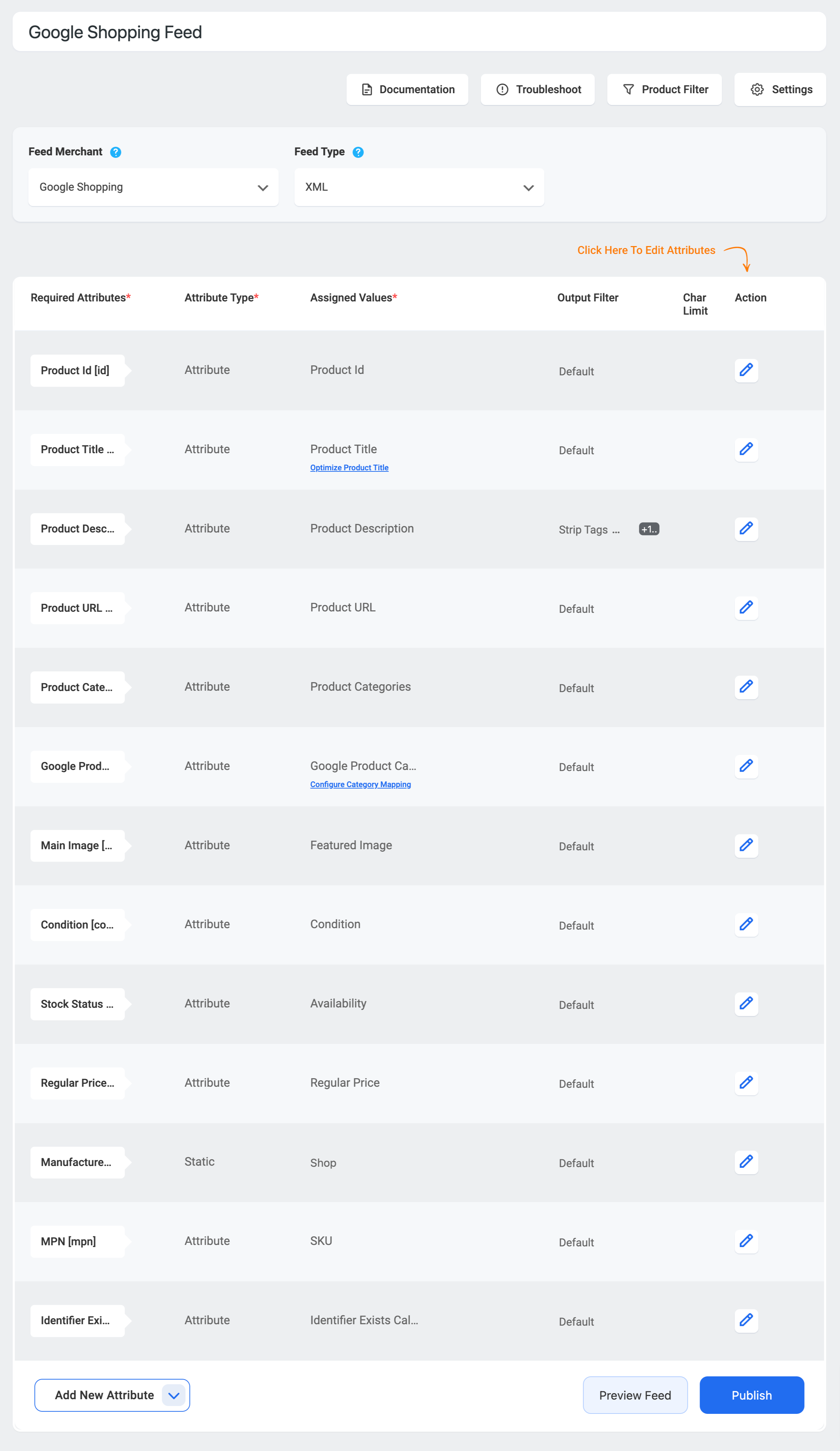
Generate WooCommerce product feed in 3 simple steps 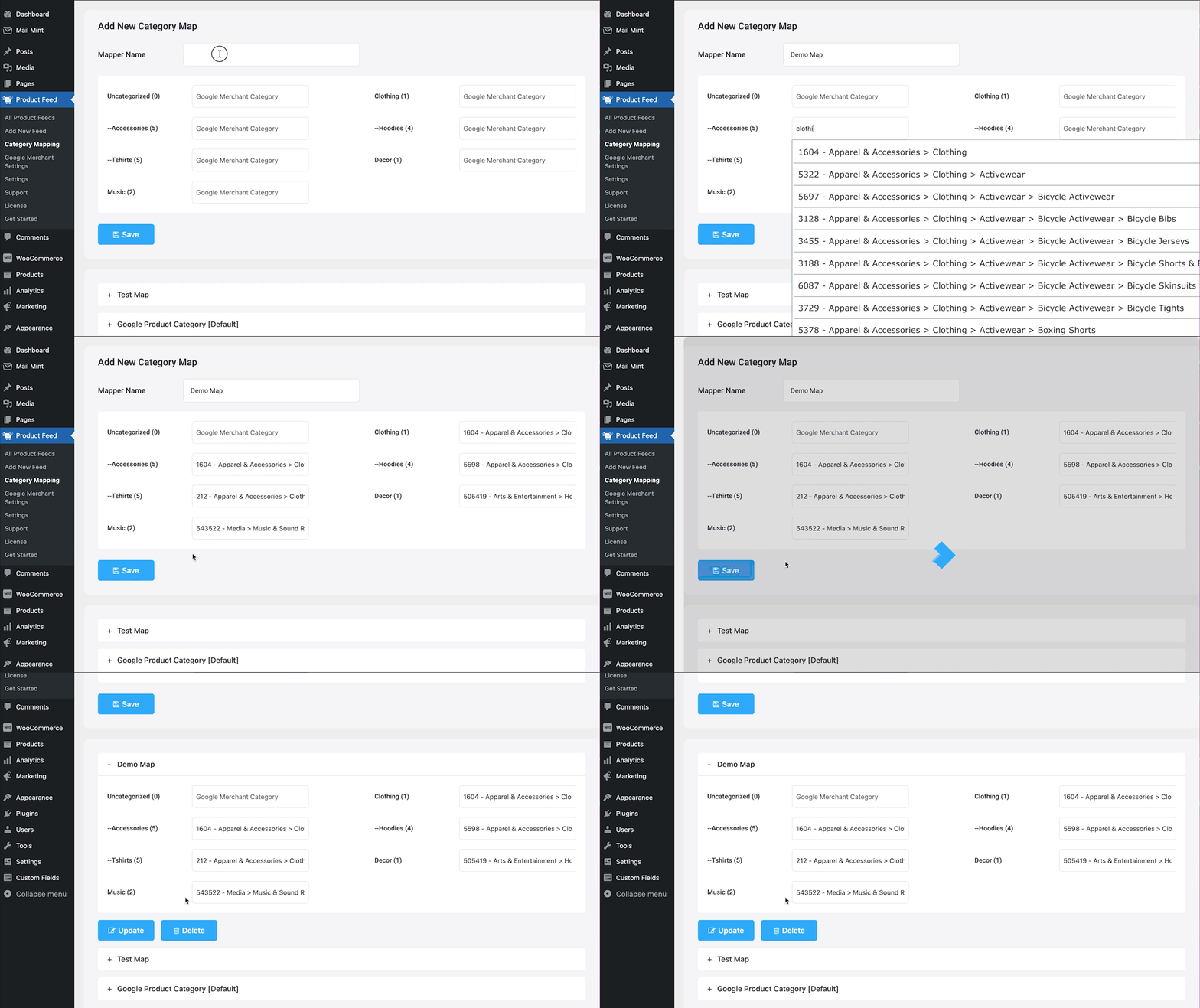
Map your WooCommerce product categories according to your preferred merchant (Example: Google Merchant Category) 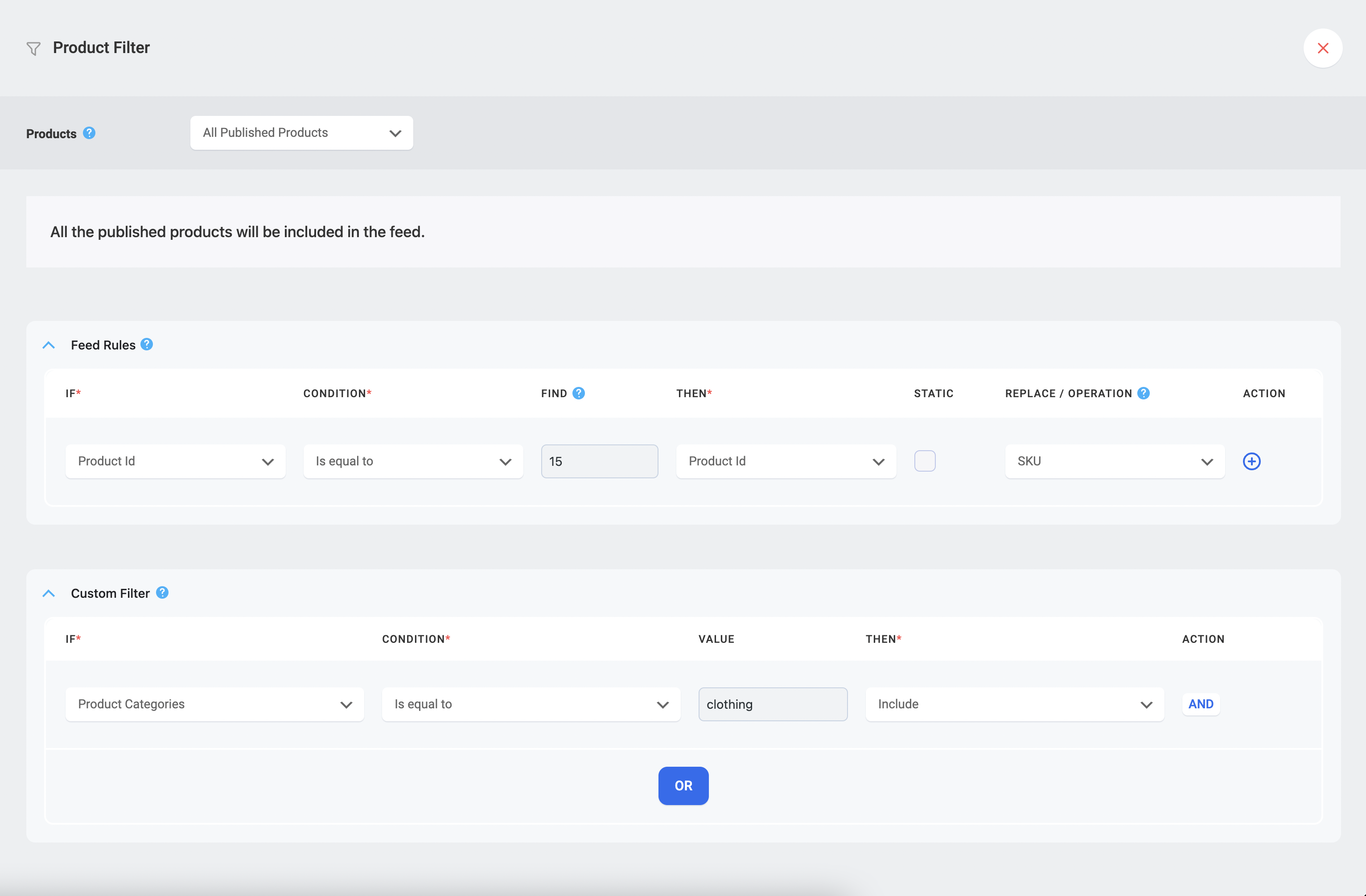
Exclude or include products in your feed using filters and conditions 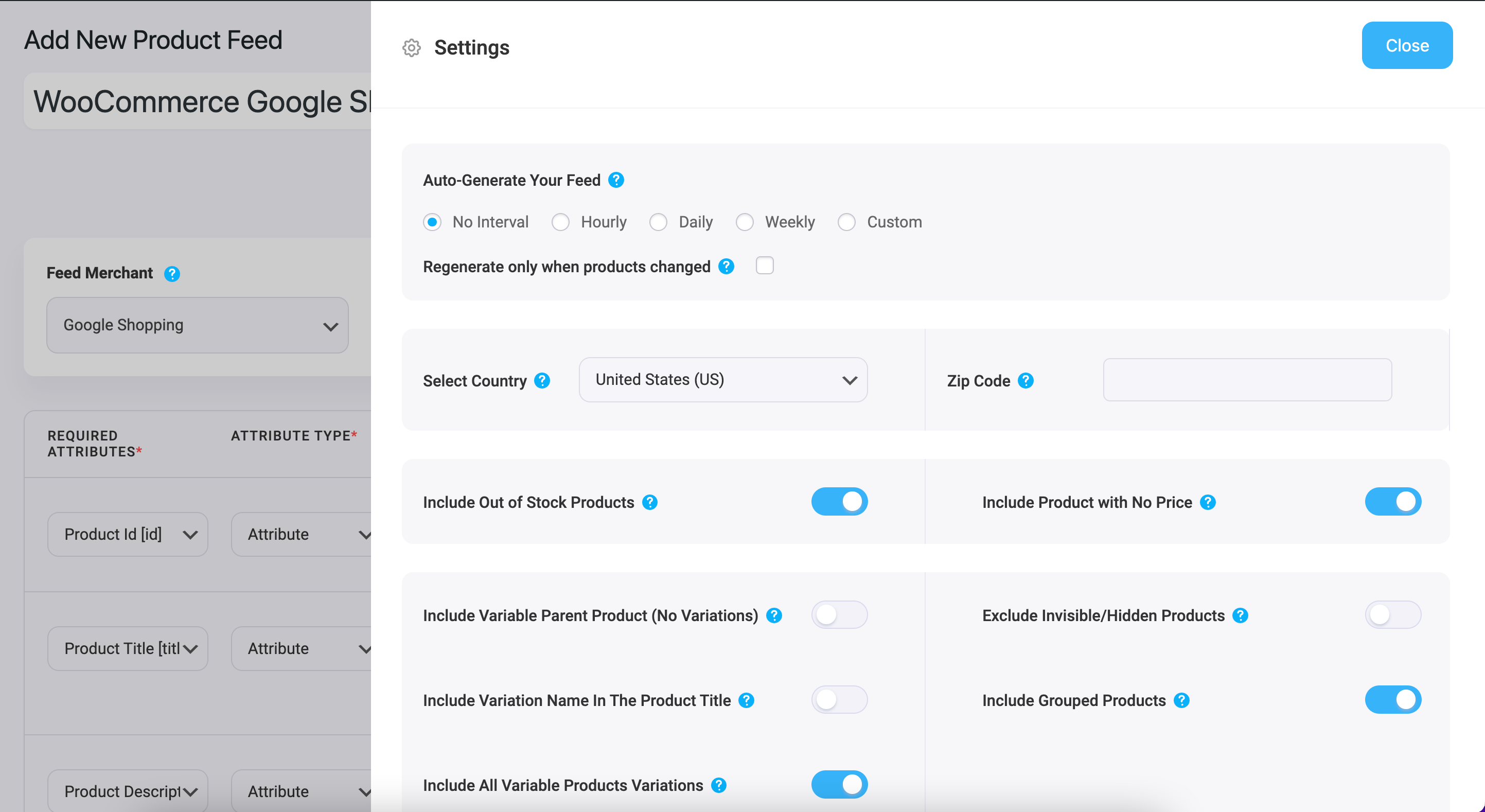
Configure your feed settings 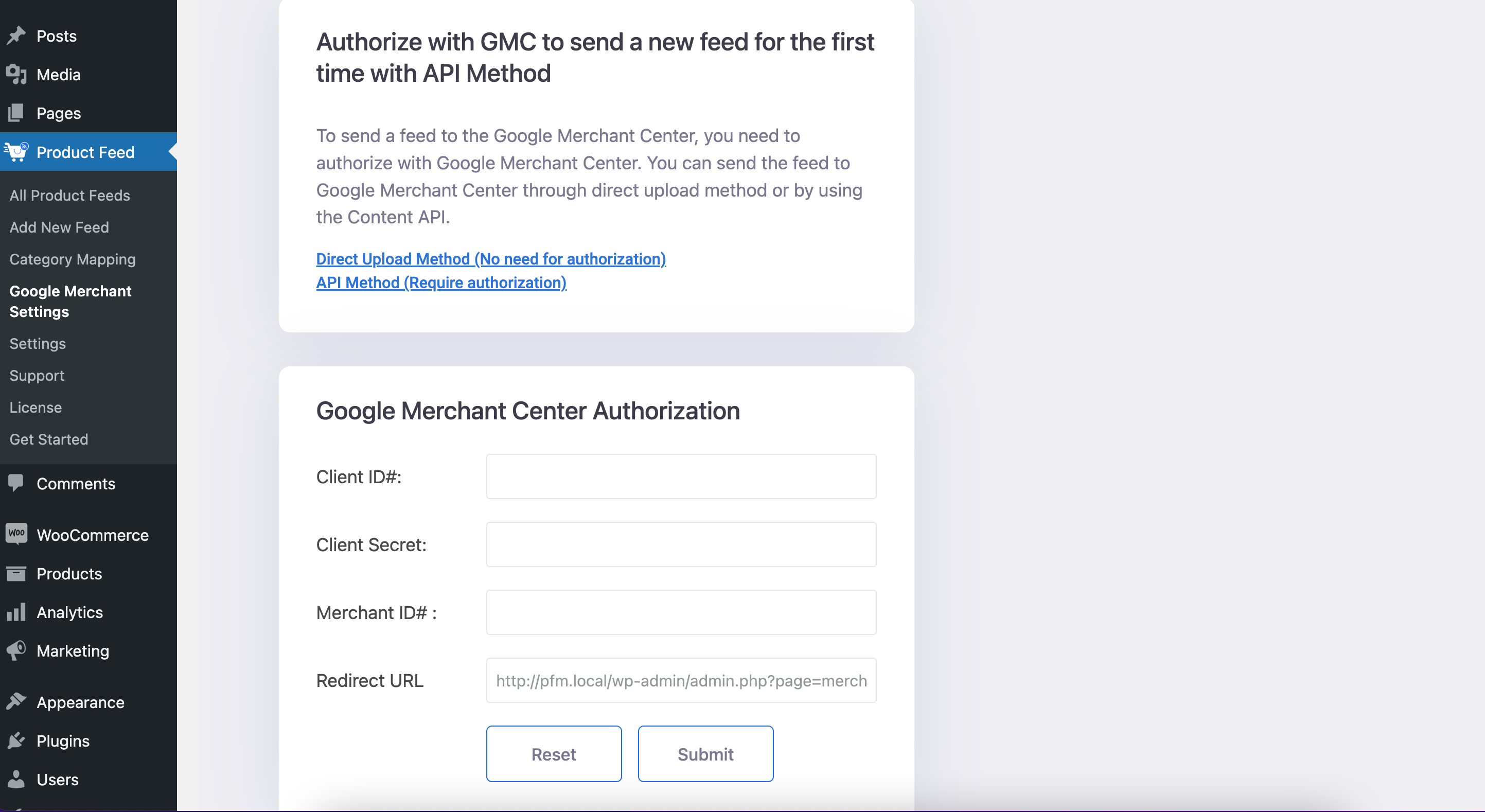
Authorize your Google Merchant Center account to send your Google Shopping Feed via the content API method 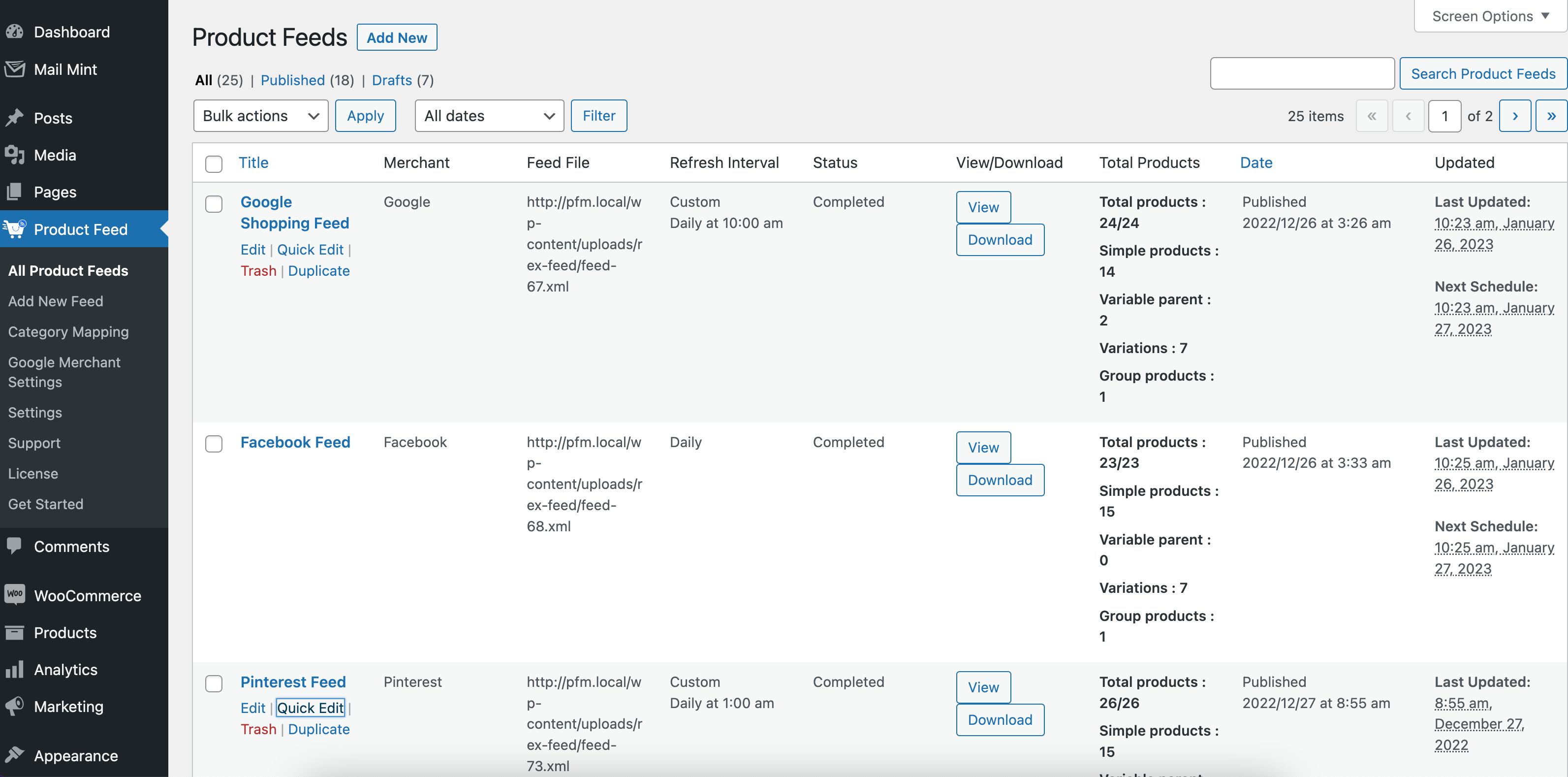
Find out all the product feeds information on a single page
Installation
Easy Product Feed Manager Installation Process in your WordPress Dashboard:
Step -1: Upload the Product Feed Manager for WooCommerce to the /wp-content/plugins/ directory and click Install Now
Step -2: Activate the plugin through the Plugins menu in WordPress
Step -3: Now, a new menu called Product Feed will appear on your dashboard. From there, you can create and manage product feeds.
Easy Feed Generation Process Using Product Feed Manager:
Step -1: Hover on the Product Feed icon on your dashboard and click on Add New Feed
Step -2: Give your feed a title.
Step -3: Select your merchant and feed type.
Step -4: That’s it; Publish your feed & send it to your merchant.
FAQ
-
Why should I choose the Product Feed Manager for WooCommerce?
-
Product Feed Manager for WooCommerce is dedicated to user satisfaction. You will get the best interface with simplicity and quality.
Everything you need to generate an effective product feed is included at Product Feed Manager for WooCommerce.This plugin was customized so that you can generate product feeds for all major merchant shops, including Google Merchant shop, Facebook Dynamic Ads, etc.
Plus, you will get a support team that is always ready to help you out.
You may test out our free version. If you see that Product Feed Manager for WooCommerce is easier to use than other such plugins and you are able to generate feed as required, then you may upgrade to our PRO version and enjoy our service to the fullest.
-
Is there a product limit?
-
There is no limit to the number of products when generating feed. You can decide on the products you want to generate feed for, and no matter how many, the feed will be generated. However, this limitless product feed is only available for pro-users.
In the free version, you can generate product feed for up to 200 products per feed. If you are satisfied with the result, you can upgrade to the pro version and use it to the full extent.
-
How do I generate WooCommerce product feed for Google Shopping?
-
Check out the easiest way to create Google Shopping feeds for your store:
-
How do I create a Facebook Product feed?
-
Check out the tutorial to generate an WooCommerce facebook product feed:
-
What file formats does this plugin generate?
-
This plugin generates product feeds in the following file formats:
- XML feed
- CSV feed
- TEXT feed
- TSV feed
- RSS feed
-
What is the feed auto-update feature?
-
For feeds that you extracted under certain specifications, you can now schedule it to be updated, with new products, automatically. You can choose daily, hourly or weekly updates of feed.
-
Can I add attributes of my own choice?
-
Yes, with the dynamic attribute feature, you can include dynamic attributes to your product feed to be generated, without altering any details on your store.
-
Does it support product variation?
-
Yes, Product Feed Manager for WooCommerce generates feed with variations as well, if you select it.
-
Can I select one single variation?
-
No, Product Feed Manager for WooCommerce supports either all the variations or no variations at all. Currently, there is no option to select one single variation.
-
Does the plugin support Google product category?
-
Yes, you can map your WooCommece product categories according to google product categories.
-
Can I add filters to my product feeds?
-
Yes, you can filter products in the feed based category, tag or any custom condition. You can even manually search for products and filter them.
-
Will the feed, I generated for any other merchant shop, work on Google Merchant Shop?
-
We have set up the important fields and saved the feed format compatible with each merchant shop. We advise you that you generate different feeds for different Merchant shops.
In the case of Google, they will not approve feeds unless it is mapped according to their required format.
We have a feed format specifically organized for the Google Merchant shop. You simply need to map your product categories with the Google Merchant shop. -
Can I send product feed to my Merchant Shop directly from Product Feed Manager for WooCommerce?
-
Product Feed Manager for WooCommerce lets you auto-sync the product feed to be automatically sent and updated on Google Merchant Shop.
You can easily set this up by following the steps in this tutorial
This feature is only there for Google Merchant Shops and no other merchant shops for now.
For other shops such as eBay, you will have to download the generated feed and upload it on your Merchant shop’s feed import section manually. -
Can I use Product Feed Manager with WPFunnels?
-
Yes. Product Feed Manager drives traffic from Google Shopping and other marketplaces. WPFunnels optimizes what happens after the click — custom checkout pages, order bumps, and upsells that increase revenue per visitor. Together they form a complete traffic-to-profit pipeline. Both plugins are built by the Linno team and designed to complement each other.
-
How do I upgrade to pro?
-
You may use the Product Feed Manager for WooCommerce to generate feed for up to 50 items in total in the free version. You may remove this limit and get feed for unlimited products by upgrading to PRO.
To upgrade to PRO, you may purchase a license key from:
WP Dashboard > Product Feed > Upgrade. -
How can I report security bugs?
-
You can report security bugs through the Patchstack Vulnerability Disclosure Program. The Patchstack team help validate, triage and handle any security vulnerabilities. If you have identified a security concern, we encourage you to utilize the platform to report it by accessing the following link: Report a security vulnerability
Reviews


Contributors & Developers
“Product Feed Manager For WooCommerce – Sell on 200+ Online Marketplaces” is open source software. The following people have contributed to this plugin.
Contributors


“Product Feed Manager For WooCommerce – Sell on 200+ Online Marketplaces” has been translated into 2 locales. Thank you to the translators for their contributions.
Interested in development?
Browse the code, check out the SVN repository, or subscribe to the development log by RSS.
Changelog
Product feed manager (Free)
7.4.79 (2026-04-17)
- Improvement: Daily aggregation and schedule telemetry flush to improve tracking efficiency
7.4.78 (2026-04-17)
- Improvement: Update promotional banner
7.4.77 (2026-04-16)
- Improvement: Add upsell section for WPFunnels and Cart Lift on setup wizard
- Improvement: Add new property for telemetry events of opt-in users
7.4.76 (2026-04-03)
- Improvement: Compatibility of translated product slugs in feed URLs with TranslatePress Business
- Bug Fix: Apply correct currency conversion (value + symbol) in feed when using Fox Currency Switcher
- New: Add support for link_template attribute in Google Local Inventory Ads feed
- Bug Fix: Remove unsupported header tags from KelkooGroup feed template to ensure compliance
- Bug Fix: Prevent illegal string offset warnings by adding proper type checks in product data retriever
- Bug Fix: Optimize feed validation to prevent memory exhaustion for large catalogs
- Bug Fix: Allow Google feed to include only variation products when parent inclusion is disabled
- Improvement: Minimize PFM frontend loading by preventing full plugin bootstrap
7.4.75 (2026-04-02)
- Improvement: Update telemetry
7.4.74 (2026-03-16)
- Improvement: Update notification banner for Eid-Ul-fitr
7.4.73 (2026-03-06)
- Bug Fix: Back button now correctly returns from Merchant step in setup wizard
- Bug Fix: Skip variation logic for simple products to prevent fatal errors
7.4.72 (2026-03-05)
- Enhancement: Update telemetry events
7.4.71 (2026-02-27)
- Enhancement: Update telemetry events
7.4.70 (2026-02-26)
- Bug Fix: Feed generation issue for variable product
- Enhancement: Add custom feed option on onboarding