

Description
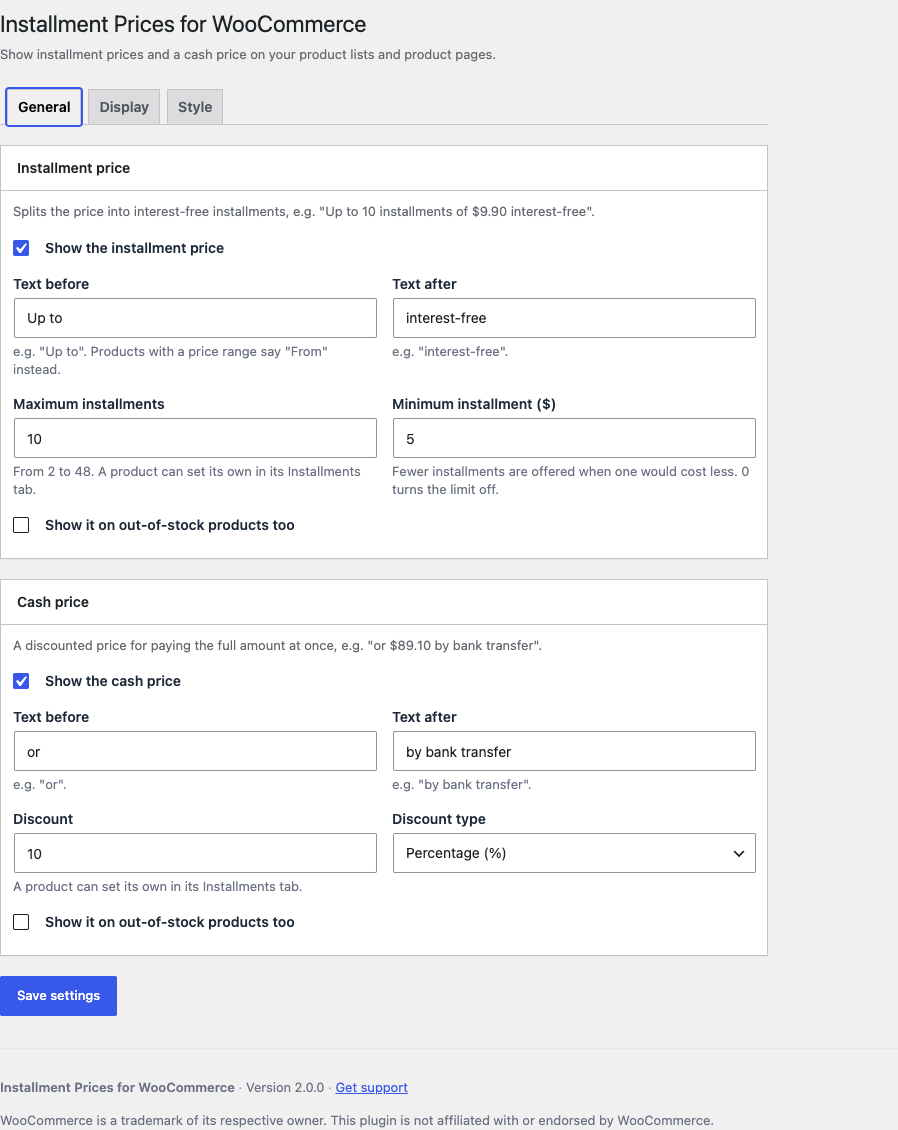
Installment Prices for WooCommerce shows shoppers what each installment would cost, and what they’d pay upfront, right under your prices:
Up to 10 installments of $9.90 interest-free
or $89.10 by bank transfer
It only displays prices. It doesn’t process payments or change what customers are charged: your payment methods still decide how they pay.
Installment price
- Split the price into as many installments as you choose, up to 48, with your own text before and after it.
- Set a minimum installment amount: fewer installments are offered when one would cost less.
Cash price
- Take a percentage or a fixed amount off for paying the full amount at once.
Placement and style
- Choose where each line appears in product lists and on the product page, in what order, and how it’s aligned.
- Set the color, weight and size of each part of each line, separately for product lists and product pages.
Per product
- Hide either line, or give a product its own maximum installments and cash discount, in its Installments tab.
And also
- Variable products show “From” figures, and the chosen variation’s own figures under its price.
- Grouped products show “From” figures.
- Out-of-stock products show the lines only if you want them to.
- Amounts follow your store’s tax display setting and price format.
- Translation-ready, with Brazilian Portuguese (pt_BR) included.
Source code & build
The compiled admin assets in public/build/ are minified. The complete, human-readable source (front-end included) and the build steps live in the plugin’s public repository: https://github.com/filipecsweb/wp-plugin-woocommerce-parcelas
Disclaimer
WooCommerce is a trademark of its respective owner. This plugin is not affiliated with or endorsed by WooCommerce.
Screenshots


Installation
- Install the plugin from Plugins Add New, or upload it to
/wp-content/plugins/woocommerce-parcelas/. WooCommerce must be installed and active. - Activate it through the Plugins screen.
- Go to WooCommerce Installment Prices, switch on the installment price, the cash price or both, and click Save settings.
FAQ
-
Does it charge customers in installments?
-
No. It only shows prices; your payment methods decide how customers pay.
-
Which price are the figures based on?
-
The price your store shows, including or excluding tax as set in WooCommerce Settings Tax. Variable and grouped products use their lowest price and say “From”.
-
Can a product have its own settings?
-
Yes. Edit the product, and open the Installments tab in the Product data box: you can hide either line there, or set the product’s own maximum installments and cash discount.
-
Does it work with block themes?
-
Yes. It uses WooCommerce’s product-list and product-page positions, which WooCommerce also provides in its block templates.
-
Can amounts use a decimal comma?
-
Yes. Amounts accept either a decimal comma or a decimal point.
-
Can I add interest to the installments?
-
Not yet.
-
How do I change the output with code?
-
Two filters receive each line’s HTML, the product, and the context (
loopin product lists,singleon the product page):installment_prices_for_woocommerce_installments_html installment_prices_for_woocommerce_cash_html -
I’m upgrading from 1.x. What changes?
-
Your settings and every product’s own settings carry over. The words between your text and the amount (“10 installments of”, “10x de” in Portuguese) now follow your site language, as English is the plugin’s source language. The output’s HTML classes and developer hooks changed, so custom CSS or code written for 1.x needs updating: the lines now use
installment-prices-for-woocommerceclasses and the two filters above.
Reviews


Contributors & Developers
“Installment Prices for WooCommerce” is open source software. The following people have contributed to this plugin.
Contributors
Translate “Installment Prices for WooCommerce” into your language.
Interested in development?
Browse the code, check out the SVN repository, or subscribe to the development log by RSS.
Changelog
2.0.0
- The plugin has a new name: Installment Prices for WooCommerce.
- Rebuilt from the ground up, with a new settings screen under WooCommerce Installment Prices. English is now the source language, and Brazilian Portuguese is included.
- A product’s own settings move to an Installments tab in the Product data box.
- A variable product’s chosen variation now shows its own figures under its price, computed by your store instead of read off the page.
- Amounts now follow your store’s tax display setting.
- Shop managers can now change the settings.
- Custom styles are now printed with the page instead of loaded from a separate generated stylesheet.
- Fixed: a fixed cash discount written with a decimal comma showed “NaN” on variable products.
- Changed: the output’s HTML classes and developer hooks were renamed.
- Changed: the maximum installments now range from 2 to 48.
- Requires PHP 8.2, WordPress 7.0 and WooCommerce 9.0 or later.
1.3.5
- Fixed custom styles (colors and more) not being applied.
1.3.4
- The scripts loaded on variable products now carry the version in their URL, to avoid stale caches.
- Added an option to show the prices on out-of-stock products.
1.3.3
- Fixed a JavaScript error on variable products whose variations had the same price.
1.3.2
- A product can now override the number of installments and the cash price.
1.2.9
- CSS declarations now use
!important. - Replaced the deprecated
get_product()withwc_get_product(). - Changed the text domain from
woocommerce-parcelastowc-parcelas.
1.2.8
- Fixed the cash price not showing on variable products with different prices when installments were off.
- Added an option to hide the installment price on specific products.
- Added an option to align the prices.
- Added options to style the prices.
- Fixed the “Bugs and suggestions” link.
1.2.7
- Added an option to hide the cash price on specific products.
1.2.6
- Fixed grouped products. Added options to position the installment and cash prices, and a discount for paying in cash.
1.2.5.3
- Fixed the Settings link below the plugin name.
1.2.5.1
- A minimum amount with a decimal comma now works on variable products.
1.2.5
- Code improvements.
1.2.4
- Bug fixes. Added actions, a filter and better CSS classes.
1.2.3
- Fixed the JavaScript for stores that use a point as the decimal separator.
1.2.2
- Full support for variable products.
1.2.1
- Translated to English.
1.2
- Added the minimum installment amount.
1.1
- Added the prefix and suffix fields.
1.0
- First release.