
Description
Meep AI Translator is an AI-powered translation plugin for WordPress that keeps your Elementor layouts, Gutenberg blocks, and WooCommerce products pixel-perfect after translation — no broken widgets, no collapsed sections, no manual fixes.
Most translation plugins treat your site as plain text. Meep AI reads Elementor’s JSON structure directly, so every widget, column, and design element stays exactly where you placed it.
Why Meep AI Translator?
- ✅ Elementor layout preserved — pixel-perfect after every translation
- ✅ Built-in language system — no Polylang or WPML required
- ✅ WooCommerce support — products, variations, attributes, gallery SEO
- ✅ No API key needed — zero setup friction
- ✅ 1,800 words per week free — resets automatically
Features:
- One-click translation for Elementor pages (single page or bulk)
- WooCommerce product translation (title, description, excerpt, attributes, variations, gallery SEO)
- Built-in language management — add languages directly in the plugin, no extra plugins needed
- Polylang and WPML integration also supported if you prefer
- Gutenberg block-based pages supported
- Classic pages and posts supported
- Context-aware AI translations using advanced LLMs — not word-for-word
- Automatic hreflang SEO tags and clean URL prefixes (/fr/, /de/)
- Language switcher widget, shortcode, and nav menu integration (4 display styles)
How It Works:
- Install and activate — no API keys, no complicated setup.
- Choose your language system: Built-in (recommended), Polylang, or WPML.
- Pick any Elementor page, Gutenberg post, or WooCommerce product.
- Choose your target languages and click Translate.
- Your site is multilingual — layouts intact, SEO tags in place.
Want a higher word limit?
- Starter – $9.99/month – 1 site, ~18,000 words/month. Perfect for small business sites.
- Agency – $34.99/month – Up to 10 sites. Best for agencies and freelancers.
- Agency Lifetime – $299 one-time – 50 sites, unlimited words. Pay once, use forever.
- Enterprise – $53.99/month – Up to 50 sites, dedicated account manager.
External Services & Privacy
This plugin connects to external services to provide AI-powered translations.
Services Used
MeepTech API (meeptech.com)
* Handles usage tracking and word count enforcement
* Receives: Website URL, word counts, language pairs
* Does NOT store your translated content
OpenAI (openai.com)
* Processes translation requests using AI language models
* Receives: Text content to be translated
* Content is sent for processing only, not stored by us
PostHog (posthog.com) – Optional
* Anonymous usage analytics (opt-in only)
* Disabled by default, requires explicit consent
What We Collect
✅ Website URL (for authentication)
✅ Word counts and language pairs (for plan limits)
What We Do NOT Collect
❌ Your translated content is not stored
❌ Personal information or email addresses
❌ User or visitor data
Privacy & Security
For data deletion, export, or GDPR/CCPA inquiries, contact sales@meeptech.com with your website URL.
Screenshots
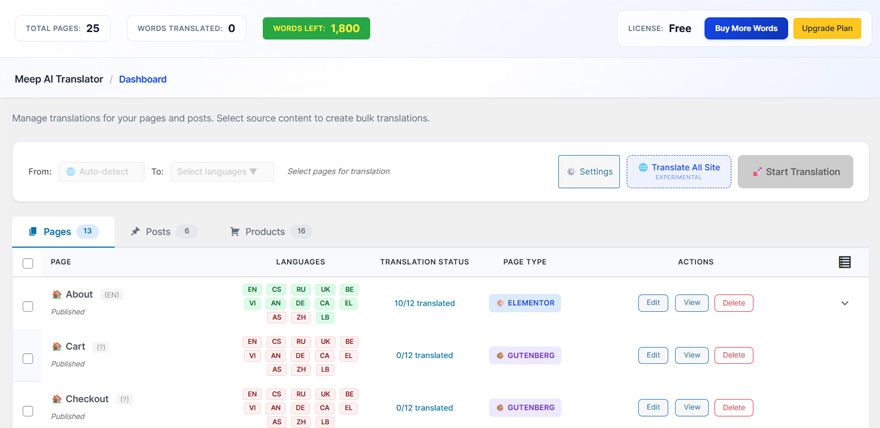
Plugin main translation interface — translate any page with one click. 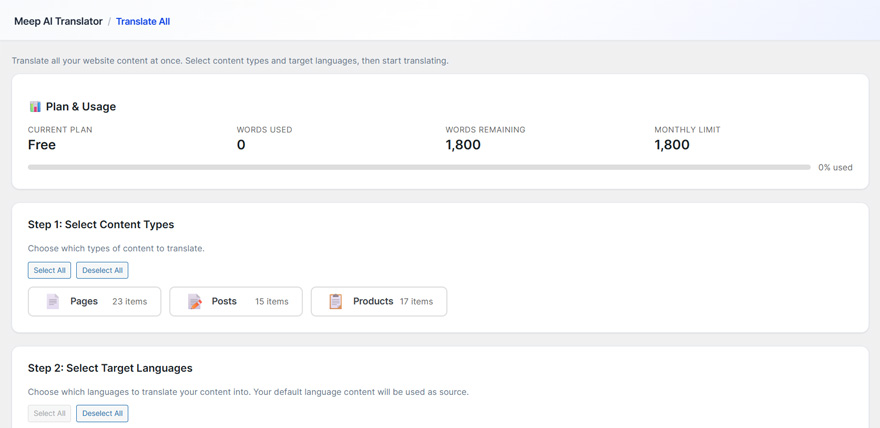
Translate All interface — bulk translate multiple pages at once. 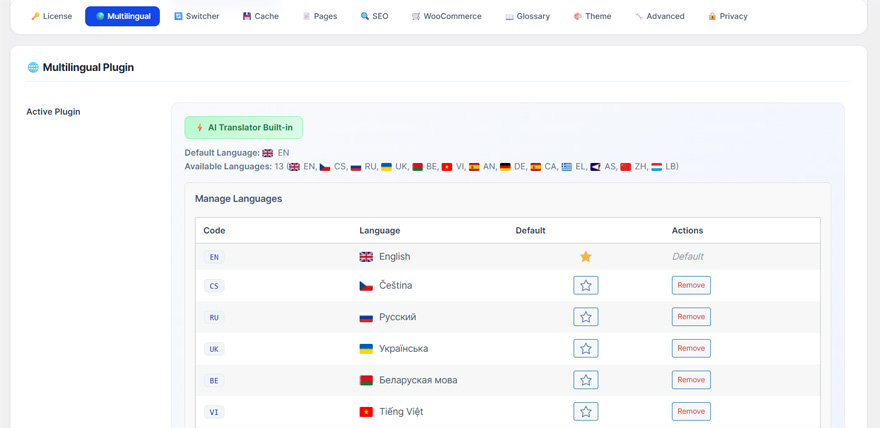
Language management settings — configure your site languages. 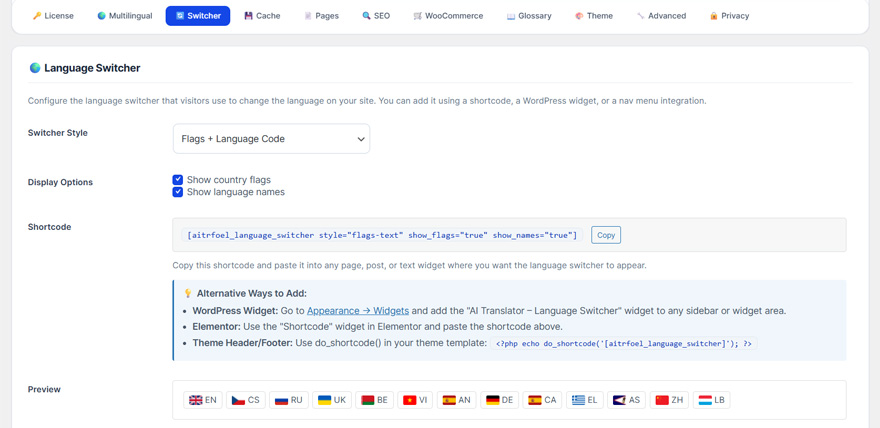
Language switcher settings — customize the frontend language switcher. 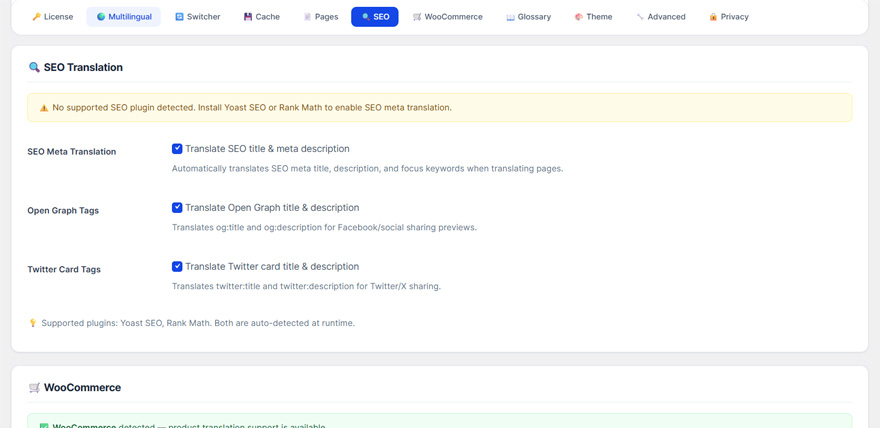
SEO translation settings — translate meta titles, descriptions, and slugs. 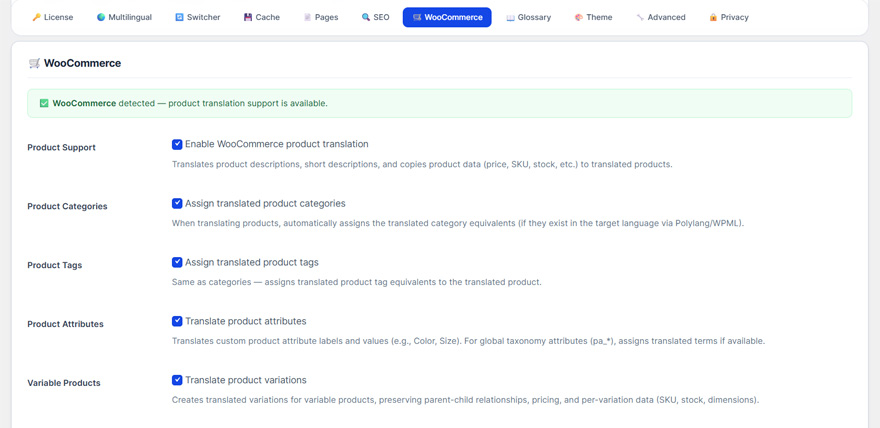
WooCommerce settings — configure product translation options.
Installation
- Upload the plugin folder to
/wp-content/plugins/or install via the WordPress Plugins screen. - Activate the plugin through the ‘Plugins’ screen in WordPress.
- Choose your language setup option:
- Built-in (Recommended): Use the plugin’s built-in language system — no extra plugins needed
- Polylang: Go to Languages Languages tab Add your languages
- WPML: Go to WPML Languages Add languages and configure
- Navigate to AI Translator in your WordPress menu.
- Start translating your pages, posts, and WooCommerce products!
FAQ
-
How do I translate Elementor pages without breaking the layout?
-
Meep AI Translator reads Elementor’s internal JSON structure directly instead of treating your page as plain text. This means every widget, column, heading, and button stays exactly where you placed it after translation. No broken sections, no collapsed widgets, no manual CSS fixes needed.
-
Can I translate a WordPress site without Polylang or WPML?
-
Yes. Since v1.3.0, Meep AI Translator includes a fully built-in language management system. You can add languages, configure URL prefixes (/fr/, /de/), and get a language switcher widget — all without installing any additional plugins. Polylang and WPML are still supported if you prefer them.
-
How do I add multiple languages to WooCommerce?
-
Install Meep AI Translator, choose Built-in language system during setup, add your target languages, then go to the Products tab in the dashboard. Select the products you want to translate, choose target languages, and click Translate. Product titles, descriptions, attributes, variations, and gallery alt text are all translated automatically.
-
Does Elementor translation work with dynamic widgets?
-
Meep AI Translator translates static Elementor content — text, headings, buttons, image captions, and any text stored inside Elementor’s JSON. Dynamic widgets that pull content from external sources or custom fields at runtime are skipped to avoid conflicts. Standard Elementor widgets are fully supported.
-
Does this work with Elementor Free or only Elementor Pro?
-
Both. Meep AI Translator works with Elementor free and Elementor Pro. No Pro license is required for translation to work.
-
Do I need my own OpenAI API key?
-
No. Translation is handled through our secure API — no setup, no API keys, no accounts with third-party services required. Just install and translate.
-
How many words can I translate for free?
-
The free version includes 1,800 words per week, which resets automatically every 7 days. There are no one-time limits — you can keep translating week after week on the free plan.
-
Does this require Polylang Pro?
-
No. It supports both Polylang free and Polylang Pro. And since v1.3.0, you don’t need Polylang at all — the built-in language system replaces it completely.
-
Will this modify my existing content?
-
No. Translations are created as separate pages or posts in the target language. Your original content remains completely unchanged.
-
How do I check how many words I have left?
-
Go to AI Translator Dashboard to see your current usage, words remaining, and weekly reset date.
Reviews


Contributors & Developers
“Meep AI Translator – Multilingual Elementor & WooCommerce” is open source software. The following people have contributed to this plugin.
Contributors
Translate “Meep AI Translator – Multilingual Elementor & WooCommerce” into your language.
Interested in development?
Browse the code, check out the SVN repository, or subscribe to the development log by RSS.
Changelog
1.4.15
- Added Extra 50,000 Words Pack addon support
- Addon license detection and word limit boost
- Dashboard badge for active addon
1.4.14
- Added: Translations for setup checklist, info card, and metabox strings (34 new strings across 9 languages)
1.4.13
- Fixed: Word count accuracy for languages with apostrophes (French, Italian, etc.) — no longer splits contractions into separate words
- Fixed: Classic Editor post title now correctly translated (batch results keyed by text, not path)
- Improved: Translation speed — parallel batch API calls for large content, word-count-aware batch splitting
- Improved: API timeout increased from 120s to 300s to prevent fallback to slow individual requests
- Added: 262 new admin UI translations across 9 languages (German, Spanish, French, Italian, Dutch, Polish, Portuguese, Russian, Ukrainian)
- Added: Plugin version number displayed in footer
1.4.12
- Fixed: Word count overcounting due to HTML entities not being decoded before counting
- Fixed: Classic Editor translation speed improved by removing duplicate regex processing
- Fixed: Post title no longer double-counted when it appears as H1 in content
- Fixed: Title extraction from batch translation results (was never matching due to path-keyed lookup)
- Fixed: Plain permalink support — translated pages now use ?lang= parameter instead of URL prefix
- Fixed: Pages without explicit language assignment now correctly show as default language instead of “(?)”
- Fixed: Pre-flight word limit check now applies the same server factor as the engine (no more false “fits” then block)
- Fixed: Bulk translation now stops all loops when word limit or cooldown is hit
- Fixed: Translation status text no longer keeps cycling after an error occurs
- Fixed: “Clear History” button now works (AJAX handler was not registered during AJAX requests)
- Fixed: Elementor translations now recorded in translation history
- Fixed: AI-preserved HTML no longer stripped and re-translated unnecessarily (major speed improvement)
- Fixed: Gutenberg post title now correctly translated (batch results keyed by text, not path)
- Fixed: Elementor title extraction moved before gap-filler to prevent path errors
- Fixed: Gap-filler no longer falsely re-translates content with valid HTML closing tags
- Added: Language badges in history tab are now clickable to filter by language
1.4.11
- Fixed: Translated pages now get proper translated slugs instead of reusing the source language slug
- Added: Exclude Words tab in Settings page for managing terms that should not be translated
- Improved: Settings button on main plugin page now clearly indicates exclude words functionality
- Fixed: Settings button now opens the exclude words modal instead of showing “coming soon” toast
1.4.10
- Fixed: “Monthly Limit Reached” notice incorrectly showing for paid license users
- Fixed: Usage reporting now sends actual license key instead of null
- Improved: Paid license detection prevents false cooldown activation
1.4.4
- Improved: Metabox now shows helpful setup message with link to dashboard when no multilingual plugin is configured
1.4.3
- Minor stability improvements
1.4.2
- Removed unnecessary dependency notices (Elementor/multilingual no longer required)
- Fixed checkbox alignment in admin settings
- Fixed language card checkbox visibility in Translate All
- Added review prompt URL trigger for dashboard
- Free version: single language selection with upgrade prompts
- UI improvements and minor fixes
1.4.1
- Added review prompt after successful translation
- Minor fixes
1.4.0
- NEW: Full WooCommerce product translation support
- Added: Translate product titles, descriptions, short descriptions, and attributes
- Added: Variable product support — variations translated with proper parent-child relationships
- Added: Product gallery image SEO — translates alt text, captions, and descriptions
- Added: WooCommerce block support in Gutenberg (skips dynamic blocks, translates content blocks)
- Added: Products tab in dashboard with dedicated management
- Added: Frontend locale switching — WooCommerce UI (Add to cart, etc.) displays in the correct language
- Added: Single custom post type URL rewrite rules for built-in language system (/de/product/slug/)
- Fixed: Built-in language taxonomy now registered for all public post types including products
- Fixed: Product content detection — products with no editor content now properly detected as WooCommerce type
- Fixed: Dashboard grouping — translated products no longer appear as duplicate entries
- Fixed: Product deletion now supported from the plugin dashboard
- Fixed: Language column in WooCommerce admin fits properly in table layout
- Improved: Translation title mapping fixed for batch API responses
- Improved: Slug generation reuses original slug when multilingual plugin is active
1.3.2
- Fixed: Word count estimates now account for server-side usage (source + translated words counted)
- Fixed: Translate All recommendation now updates dynamically based on page selection checkboxes
- Fixed: Usage reporting changed from non-blocking to blocking so cooldown and word limits propagate correctly
- Fixed: License status cache now invalidated after each usage report for accurate word-limit enforcement
- Improved: Selection summary and recommendation labels clarified as “estimated API words”
1.3.1
- Fixed: Translated pages returning 404 — built-in language URL rewrite rules were not persisted to database after setup
- Fixed: Rewrite rules now self-heal if missing from stored rules (e.g. after reinstall or AJAX setup)
- Improved: Translation slug now uses translated title instead of original-slug-lang pattern
- Changed: Admin menu label shortened to “AI Translator”
- Updated: Plugin short description to fit WordPress.org character limit
1.3.0
- NEW: Built-in language management system — translate without Polylang or WPML
- Added onboarding screen with 3 options: Built-in (recommended), Polylang, or WPML
- Added inline language setup wizard with searchable language picker
- Added language switcher WordPress widget (list, dropdown, or flags style)
- Added [aitrfoel_language_switcher] shortcode
- Added optional language switcher auto-append to navigation menus
- Added language column to Posts/Pages admin list
- Added REST API language and translations fields for all public post types
- Added hreflang SEO tags for built-in language system
- Added WordPress core sitemap filtering by language
- Added URL rewriting with language prefix (/fr/page-slug/) including pagination, feeds, categories, tags
- Added full language management in Settings page (add/remove languages, set default)
- Polylang is no longer a required plugin dependency
- Updated all readme files and installation instructions
1.2.7
- Compact onboarding screen — “What You Need” and “How It Works” now side by side so everything fits in one view
- Hides all admin notices on the onboarding page for a clean, focused experience
- Removed redundant multilingual plugin notice on the plugin’s own setup page
1.2.6
- Dashboard now separates Pages and Posts into dedicated tabs for cleaner navigation
- Modernized dashboard UI with refined styling, card-based stats, and improved visual hierarchy
- Added “Go to Source Post” link on translation posts metabox for quick access to translate
- Improved tab navigation with animated transitions and item counts
- Updated language flags, page type badges, and table headers with modern design
1.2.5
- Improved onboarding experience when no multilingual plugin is installed
- Added friendly welcome screen with step-by-step setup guide
- Added language configuration detection – shows warning when languages not set up
- Updated installation instructions with Polylang and WPML setup details
- Updated “How it works” to include Gutenberg and Classic Editor support
- Fixed critical error on settings page when no multilingual plugin active
- Updated Enterprise plan to 50 sites limit
1.2.4
- Fixed critical batch translation bug – translations now apply correctly in first pass
- Fixed permanent deletion for translated pages (skips trash for cleaner workflow)
- Added auto-refresh after deleting translations to update available languages
- Fixed AI instruction artifacts appearing in translations (e.g., “Translating the text…”)
- Fixed PHP warning for levenshtein() with strings over 255 characters
- Added proper noun and acronym detection (names like “John Smith” and “CEO” no longer mistranslated)
- Improved translation quality for less common languages (Romanian, Bulgarian, Croatian, etc.)
- Added language-specific retry boost for rare languages
- Fixed WPML permalink caching issue – translation links now show correct language immediately
- Added Debug Mode toggle in settings to control verbose logging
- Improved delete confirmation messages for translations vs original pages
1.2.3
- Minor bug fixes
1.2.2
- Fixed license plan sync issue – Enterprise/Agency plans now correctly sync from Freemius
- Added auto-sync for plan mismatches (checks hourly)
- Added “Sync Plan” button in settings for manual plan synchronization
- Improved Luxembourgish translation support with language-specific instructions
- Fixed HTML structure corruption during translation (SVG elements, nested tags)
- Fixed issue where original text was appearing above translation
- Added language instructions for rare languages (Frisian, Breton, Occitan, Corsican, Romansh)
- Plugin now sends language-specific instructions to translation server for better accuracy
- Improved license activation to properly extract plan from Freemius license
1.2.1
- Added basic WPML support
1.2.0
- Added Gutenberg/Block Editor translation support
- Added “Manage Languages” button in settings for quick access to Polylang/WPML
- Plugin now visible in menu even when dependencies are missing (with setup guide)
- Fixed translation not being applied to Gutenberg content
- Fixed HTML tag corruption during translation
- Fixed API response mapping for translations
- Fixed HTML entity handling during text replacement
- Improved error messages with direct links to install required plugins
- Renamed plugin references to “Meep AI Translator” for consistency
1.1.5
- Added “Activate License” submenu for PRO version
- Users can now enter license key without reactivating plugin
- Improved license activation flow
1.1.4
- Fixed YouTube video error 153 in welcome popup
- Video now opens on YouTube instead of embed (more compatible)
- Fixed all remaining emoji encoding issues
- Fixed translation completion detection
1.1.3
- Fixed JavaScript syntax error causing dropdowns to not work
- Fixed language selector not responding to clicks
1.1.2
- Added server-side Freemius license validation
- License expired users are now properly downgraded to Free plan
- Added admin notice for expired licenses
- Dashboard now shows “Expired” status when license is invalid
- Updated pricing: Starter $9.99/month, Agency $34.99/month
- Added translated readme files for 9 languages
- Improved license status accuracy
1.1.1
- Added pricing plans to readme
- Improved PRO build script with automatic readme branding
- Minor improvements
1.1.0
- Fixed plugin name (removed PRO from free version)
- Updated readme for free version
- Added admin interface translations for 9 languages
- Added optional usage analytics with user consent
- Fixed WordPress plugin checker errors
- Performance improvements
1.0.8
- Bug fixes and improvements
1.0.7
- Initial public release
- Elementor + Polylang integration
- OpenAI translation engine
- Usage tracking and limits
- Clean admin interface