
Description
The “Image Alt Text” plugin is a simple yet powerful tool that allows website owners and content creators to easily edit the alt tags for images on their website. Alt tags, or alternative text descriptions, are important for both accessibility and search engine optimization (SEO) purposes, as they provide a textual description of an image for users who are visually impaired or for search engines that cannot interpret images.
With this plugin, website owner and admins can easily edit alt tags for all images on their website directly from the Plugin Menu. The plugin provides a user-friendly interface that allows users to quickly update alt tags for individual images or copy alt text for all missing images. Additionally, the plugin includes a feature to generate alt tags based on the image file name, saving users time and effort.
Technical Support
We would always love to hear from you about plugin issue, queries and enhancements. Please use native support forum to benefit other users also if they have the same issue. Visit our support on the Plugin’s Forum.
Features
-
Provides a list existing media alt text details in table format so user can edit alternative text.
-
Provides a list of media file for missing alternative text to update.
-
Provides a option in both existing and missing alternative list to copy file name as alternative media file.
-
Provides a dropdown to update alternative text to missing alternative media file in bulk.
-
Search images easily with available table column header.
-
Sort image table data in ascending and descending order to easily find the images.
-
Plugin is available for multisite also.
Pro Features
Image Alt Text Pro gives you 4 leading AI vision providers on a simple yearly plan — no per-image fees, no credit limits. Bring your own API key and pay the provider directly at their standard rate.
Buy Pro Image Alt Text
-
4 AI Vision Providers — Bring Your Own Key
Generate highly accurate, SEO-friendly alt text using OpenAI GPT-4o, Google Gemini 2.0 Flash, Claude AI (Haiku), or Hugging Face (Qwen2.5-VL). Connect any provider with your own API key. Write a custom prompt tailored to your site’s tone and SEO goals. You pay the AI provider directly — no markups, no bundles. -
Auto-Generate Alt Text on Every Upload
Set it and forget it. The moment an image is uploaded, alt text is generated automatically using your preferred method (OpenAI, Gemini, Claude, Hugging Face, Post Title, or Filename). No manual steps required. -
One-Shot Bulk Actions
Process every image in your current view with a single click. No selection needed — just pick an action (Copy Title, Copy Filename, or any AI provider) and click Process. Configurable batch size controls how many images are sent to the AI API per request. -
Unlimited Bulk AI Selection
Select any number of images in Bulk Action and run AI generation across all of them. Images are processed one at a time sequentially — no timeouts, no rate-limit errors regardless of selection size. -
Bulk Caption Actions
Copy post titles or filenames to image captions in bulk. Also supports per-image caption update directly from the image list. -
Decorative Image Accessibility (WCAG 2.1)
Mark any image as decorative in the media library. The plugin automatically injectsrole="presentation"andaria-hidden="true"on the frontend so screen readers skip the image entirely. Covers both Gutenberg image blocks and PHP-rendered images. -
SEO Quality Score for Every Image
Every image in your library is rated Excellent, Good, or Needs Work based on alt text quality — so you can prioritise which images need attention first. -
Visually Spot Missing Alt Text on Your Live Site
Enable a frontend highlight to outline images missing alt text directly on your published pages. Instantly see where the gaps are without digging through the media library. -
Advanced Date Range Filters
Filter your image list by Today, Last 7 Days, Last 30 Days, Last 6 Months, Last 12 Months, Last 3 Years, or a custom range — ideal for large media libraries or audits. -
Central Settings Panel
Sidebar-navigated settings page to configure AI providers, API keys, custom prompts, upload automation, batch size, and highlight preferences — all in one place.
Screenshots
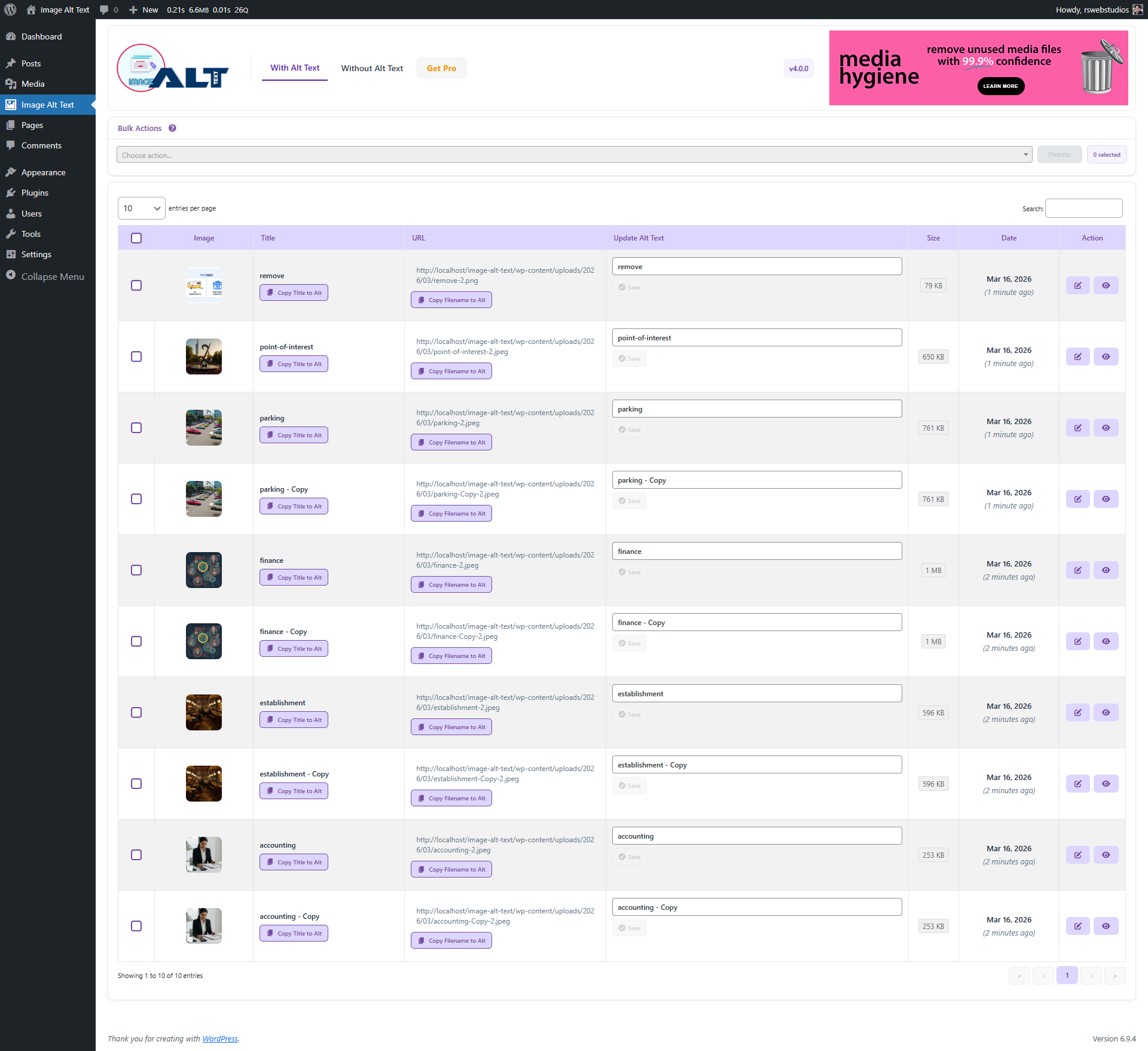
Version 4.0.0 – Images with Alt Text — redesigned smart inline editor with Copy Title to Alt, Copy Filename to Alt, Save/Reset buttons, Size column and Bulk Actions 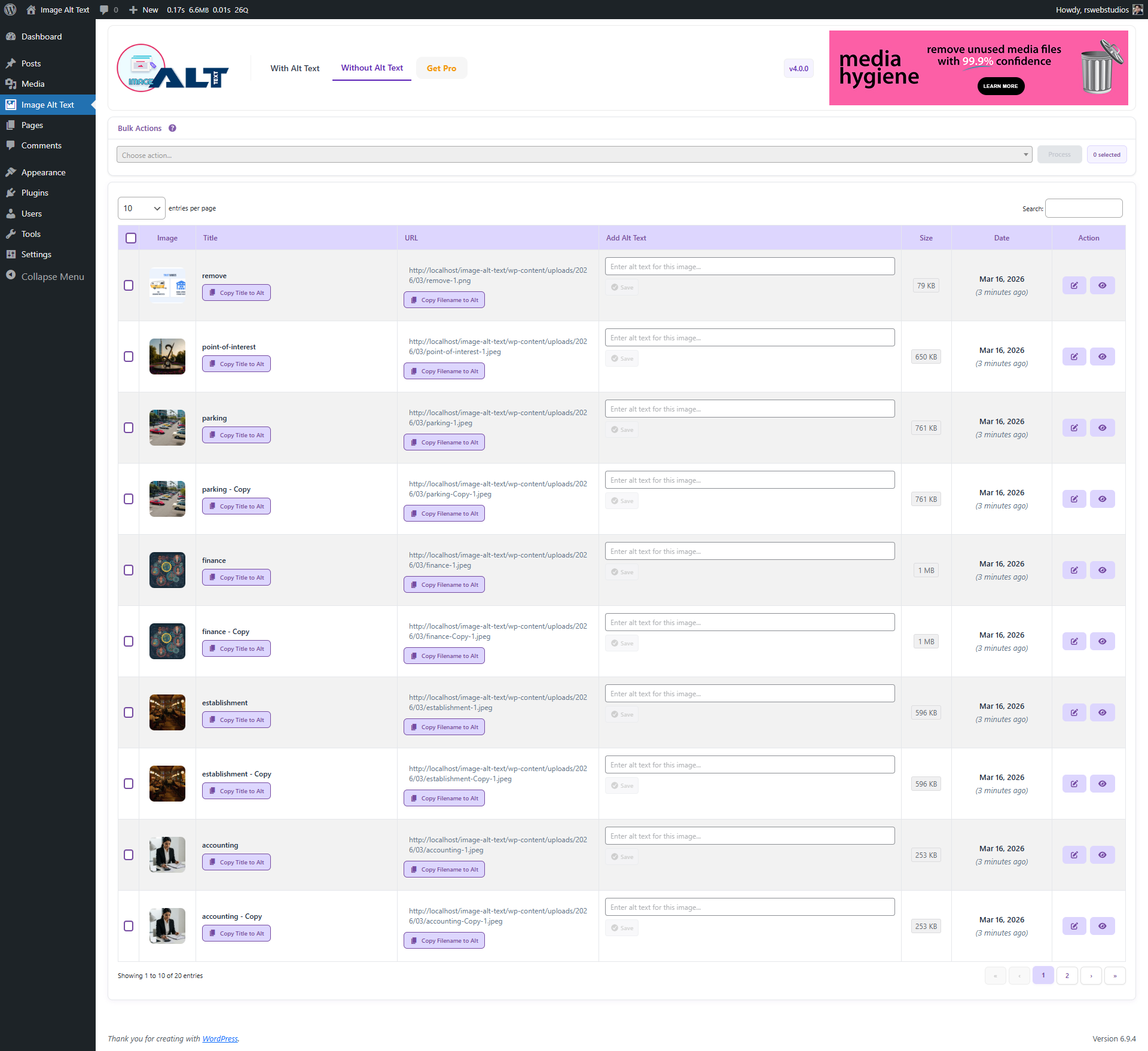
Version 4.0.0 – Images without Alt Text — redesigned layout with bulk checkbox selection, inline alt text editor and improved action buttons
Installation
From Your WordPress Dashboard
- Go to Plugins >Add New
- Search for Image Alt Text
- Click on Install Now Button
- Click on Activate Now Button to use plugin in your site.
From WordPress.org
- Download Image Alt Text
- Upload the image-alt-text folder to the /wp-content/plugins/ directory
- Activate Image Alt Text plugin from your plugins page.
FAQ
-
How is this plugin different from default WordPress media?
-
This plugin allow you to easily edit the alternative text of images on the same page. It is easy for images with different parameters without page refresh.
-
Why Use Bulk Alt Text?
-
- Improve Image SEO by ensuring images have descriptive alt text.
- Boost accessibility for screen readers and assistive technologies.
- Save time by updating alt text for many images at once.
- Optimize existing media libraries without editing images individually.
This feature is especially useful for websites with large media libraries that need quick alt text optimization for better search engine visibility and accessibility compliance.
-
No, there is not redo button for now.
-
Where can I ask for help?
-
Please reach out via the official support forum on WordPress.org.
Reviews


Contributors & Developers
“Image Alt Text” is open source software. The following people have contributed to this plugin.
Contributors


Translate “Image Alt Text” into your language.
Interested in development?
Browse the code, check out the SVN repository, or subscribe to the development log by RSS.
Changelog
4.0.2
- Improvement – Admin header completely redesigned with purple brand identity, gradient top accent stripe, and subtle depth shadow for a more polished look.
- Improvement – “Get Pro” header button replaced with a branded purple gradient CTA with ⚡ icon and smooth pulse animation — replacing the previous flashing text effect.
- Improvement – Media Hygiene cross-promotion replaced with a compact pill badge in the header, linking to the free WordPress.org plugin page.
- Improvement – Review notice updated to match brand colours with purple left accent, improved button hierarchy, and aligned single-row layout.
- Improvement – Get Pro page hero section updated with 5 floating feature badges (AI Powered, SEO Optimized, WCAG Compliant, 8,000+ Active Sites, 4 AI Providers).
- Improvement – Get Pro page CTA section headline and subline updated with accurate install count (8,000+ active sites) and stronger conversion copy.
- Improvement – All UTM parameters standardised across Get Pro page links for accurate Google Analytics 4 traffic attribution.
- Improvement – WordPress.org readme Buy Pro link updated with correct UTM tracking parameters.
4.0.0
- Improvement – Completely redesigned admin UI with a cleaner, more modern layout and updated plugin branding.
- Implementation – Smart inline alt text editor with integrated Save and Reset buttons — no page refresh needed.
- Implementation – “Copy Title to Alt” row action button added directly inside the Title column for one-click alt text population.
- Implementation – “Copy Filename to Alt” row action button added inside the URL column to use the image filename as alt text.
- Implementation – Bulk Actions dropdown allowing Copy Title or Copy Filename to alt text across multiple selected images at once.
- Implementation – Bulk checkbox selection column added for selecting individual or all images on the current page.
- Implementation – File size column added to the image list for quick reference.
- Improvement – Date column now displays a human-readable relative time (e.g. “5 months ago”) alongside the formatted date.
- Improvement – Action buttons redesigned as icon buttons (Edit and View) replacing the previous text-based Update button.
- Improvement – “Attached To” column removed for a more focused and less cluttered table layout.
- Improvement – Tabs renamed from “With Alt” / “Without Alt” to “With Alt Text” / “Without Alt Text” for clarity.
- Security – SQL queries in uninstall routine updated to use prepared statements.
- Security – Removed server filesystem path exposure from JavaScript localization data.
- Security – Replaced deprecated extract() with explicit variable assignment in view rendering.
- Security – Consistent input sanitization and output escaping applied throughout all AJAX handlers and HTML output.
3.0.0
- Improvement – Layout to provide a more intuitive and user-friendly interface.
- Implementation – Introduced functionality for easily adding alt text by associated page/post + Image title through both row actions and bulk actions.
- Implementation – Performance enhancements to reduce load times and improve overall system responsiveness.
2.0.0
- Implementation – Available for multisite installed
- Improvement – Data loading with fast speed
1.0.0
Release Date: February 28th, 2023
* Initial release on WordPress.org.