
Description
Design your badge for WooCommerce for coming soon products easily, and choose which products will be shown!
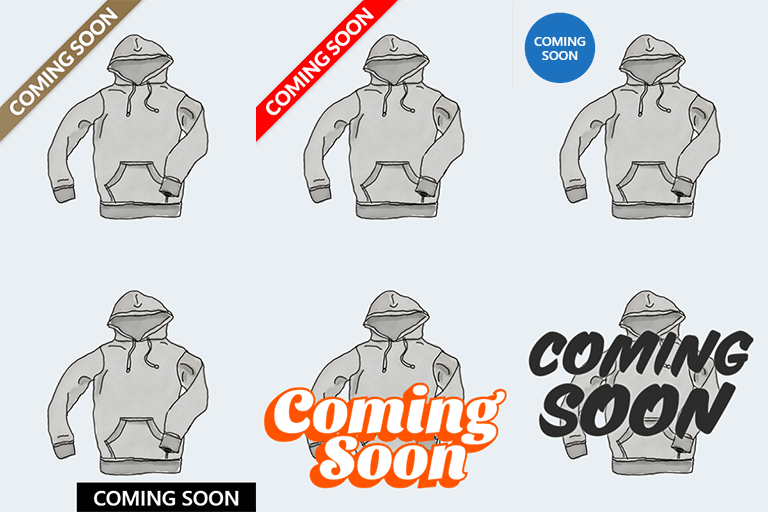
Coming Soon Badges are 100% customizable, available on loop and/or product pages. Easy and professional: Upload your image, use predefined one or set the text and design the style, color and position in a friendly interface with live editor.
⭐ Text or image badges
-
Text badge: set text, font-size, color, background, position etc.
-
Image badge: choose between predefined images or upload your own. Then set the size and position
🚀 Features
-
Custom badge with full control over design: position, size, colors, font-weight, margins, paddings, etc.
-
Super easy and friendly designer: all without writing one line of CSS, with visual live preview.
-
Set the same or distinct badge for products loop / product page (or switch off the badge on one of them).
-
Upload your own image if you prefer, or de-activate all plugin CSS generation and add your own.
-
Simple switch on/off on product edition, will show/hide the coming soon badge over the product thumbnail.
-
Highly compatible: works fine with most of WooCommerce themes, also Elementor and Divi.
-
WYSIWYG badge editor: setup it easily in the admin side, with live preview.
Screenshots

Text shapes, predefined images or custom image for badge selector 
The badge styles configurator: friendly and with preview 
The loop 
The product page
Installation
Can be installed as usual:
-
From admin plugins>add new page: search “coming soon for woocommerce” and click on install button, then activate.
-
Or download from wordpress.org and upload on plugins>add new.
-
Go to Woocommerce > Coming Soon Badges and edit your badge
How to configure the plugin?
-
Activate it
-
Setup the badges in Woocommerce > Coming Soon Badges (you can skip this step, will work by default with a gray spot badge)
-
Edit any product on which you want to show the badge, and activate the checkbox labeled “Show Coming Soon badge” under the publication product date.
FAQ
-
Where I design the badges?
-
On the admin side, go to WooCommerce > Coming Soon Badges
-
How to disable adding to cart when the product is set to coming soon?
-
The plugin doesn’t do this yet. There are two ways in WooCommerce to prevent a product from being purchased:
-
You can remove the regular and sale price for a product, or
-
You can set the product stock to 0, or the stock status to out of stock (if you haven’t set the WooCommerce product setting “Hide out of stock items from catalog”, otherwise product will be hidden)
-
-
Where do I set the Coming Soon badge for my products?
-
Open a product for editing and activate the checkbox labeled “Show Coming Soon badge”, located just below the publication date. Then save the product.
-
Will it work with my theme?
-
We can’t be 100% sure, but the plugin was coded following the standard WooCommerce template system and should work well with any theme.
In any case, it was designed carefully to ensure it doesn’t break the layout if it isn’t fully compatible.Please write to us on the support forum to let us know whether the plugin works well with your theme or not. Your feedback will help us and other users, and we will try to make it work for you if it doesn’t.
-
I’m a theme developer. How can I make my theme compatible?
-
Coming Soon for WooCommerce works with the actions found in the standard product loop and single product templates.
The used actions to print the badge code are:
For single product: do_action( ‘woocommerce_before_template_part’ );
For product loop: do_action( ‘woocommerce_shop_loop_item_title’ );You can find this actions in the templates:
wp-content/plugins/woocommerce/templates/single-product.php (single product template)
wp-content/plugins/woocommerce/templates/content-product.php (print each product on loop)…if you want to override these files in your WooCommerce child theme, or if you’re coding a theme from scratch, you may have the same file names in your theme folder:
wp-content/themes/your-theme/woocommerce/content-product.php
wp-content/themes/your-theme/woocommerce/single-product.phpin this case, simply check you’ve this actions on your code:
For single product: do_action( ‘woocommerce_after_main_content’ );
For product loop: do_action( ‘woocommerce_shop_loop_item_title’ );…and Coming Soon for WooCommerce will do the rest 🙂
-
How can I debug my theme template system for compatibility with Coming Soon Badges?
-
First, ensure you’re logged as admin, otherwise the plugin will not show any information.
Then add this parameter to the end of any page URL: ?coming-soon-wc=1
In this way: www.mywebsite.com/?coming-soon-wc=1
Look into the code for: log info
-
The badge preview is not exactly the same as the badge on the front end
-
The plugin can’t guess your theme font-family or product thumbnail size, so maybe you should adjust a bit the text and badge size.
Reviews


Contributors & Developers
“Coming Soon Badges for WooCommerce” is open source software. The following people have contributed to this plugin.
Contributors
Translate “Coming Soon Badges for WooCommerce” into your language.
Interested in development?
Browse the code, check out the SVN repository, or subscribe to the development log by RSS.
Changelog
1.1.3 – 2026-03-24
- Fixed: Solved PHP deprecated warning
- Fixed: Solved “Translation loading domain was triggered too early” notice
1.1.2 – 2026-03-16
- Fixed: Bug saving the “Show Coming Soon badge” checkbox in product page
- Checked for WooCommerce 10.6.1
1.1.1 – 2026-03-11
- Improved performance: CSS + JS minfied
- Checked for WooCommerce 10.5.3
1.1.0 – 2026-01-09
- Checked for WordPress 6.9
- Checked for WooCommerce 9.4
- Checked for PHP 8.4
1.0.19 – 2025-02-19
- Checked for WooCommerce 9.4
1.0.18 – 2024-11-18
- Checked for WordPress 6.7
- Checked for WooCommerce 9.4
1.0.17 – 2024-09-24
- Checked for WordPress 6.6
- Checked for WooCommerce 9.3
1.0.16 – 2024-05-10
- Support for WooCoommerce HPOS, the WooCommerce CRUD, aka High-Performance order storage (COT)
- Checked for WordPress 6.5
- Checked for WooCommerce 8.8
1.0.15 – 2023-06-26
- Support added for Luchiana – Cosmetics Beauty Shop Theme
(and maybe others, that image product is hidden when the badge is shown) - Checked for WordPress 6.2
- Checked for WooCommerce 7.8
1.0.14 – 2022-12-22
- Support added for Divi Theme from Elegant Themes
- Checked for WordPress 6.1
- Checked for WooCommerce 7.2
1.0.13 – 2022-05-26
- Checked for WordPress 6.0
1.0.12 – 2022-05-04
- Support added for Elementor theme builder templates (when the main product image is displayed as background)
- Checked for WooCommerce 6.4
1.0.11 – 2022-02-11
- Checked for WordPress 5.9
- Checked for WooCommerce 6.2
1.0.8 – 2021-09-12
- Checked for WooCommerce 5.6
- Added z-index:1 on style CSS for Storeship theme compatibility and maybe others
1.0.7 – 2021-07-19
- Checked for WordPress 5.8 and WooCommerce 5.5
- Text-domain changed to the same as plugin slug: coming-soon-for-woocommerce
1.0.6 – 2021-07-14
- Solved debug code (really sorry, guys!)
1.0.5 – 2021-07-14
- Better compatibility for some themes
1.0.4 – 2021-06-9
- Removed forgotten tracking info on PHP log error file
1.0.3 – 2021-06-9
- Bug solved for west/negative UTC offset timezones: coming soon checkbox was always checked
1.0.2 – 2021-02-13
- WooCommerce 5.0 support
- PHP 8 support
- PHP warning solved
1.0.1 – 2020-12-30
- Admin screen support for RTL languages
1.0.0 – 2020-12-13
- Hello world!